
Affiliate Marketing With WordPress: 5 Plugins You Need
Discover the 5 essential WordPress plugins every affiliate marketer needs. Learn how to manage links, boost conversions with displays, and track clicks effectively.

- Why Native WordPress Fails Affiliate Marketers
- Plugin 1: The Link Manager (ThirstyAffiliates or Pretty Links)
- Plugin 2: The Display & Conversion Engine (Lasso or AffiliateWP/AAWP)
- Plugin 3: The SEO Powerhouse (Rank Math or Yoast)
- Plugin 4: The Analytics Bridge (MonsterInsights or Site Kit)
- Plugin 5: The Performance Optimizer (WP Rocket or FlyingPress)
- The Implementation Framework: Launching a Campaign
- Common Technical Pitfalls to Avoid
- Evaluating the Cost: Free vs. Premium Tiers
- Next Steps for Your Affiliate Platform
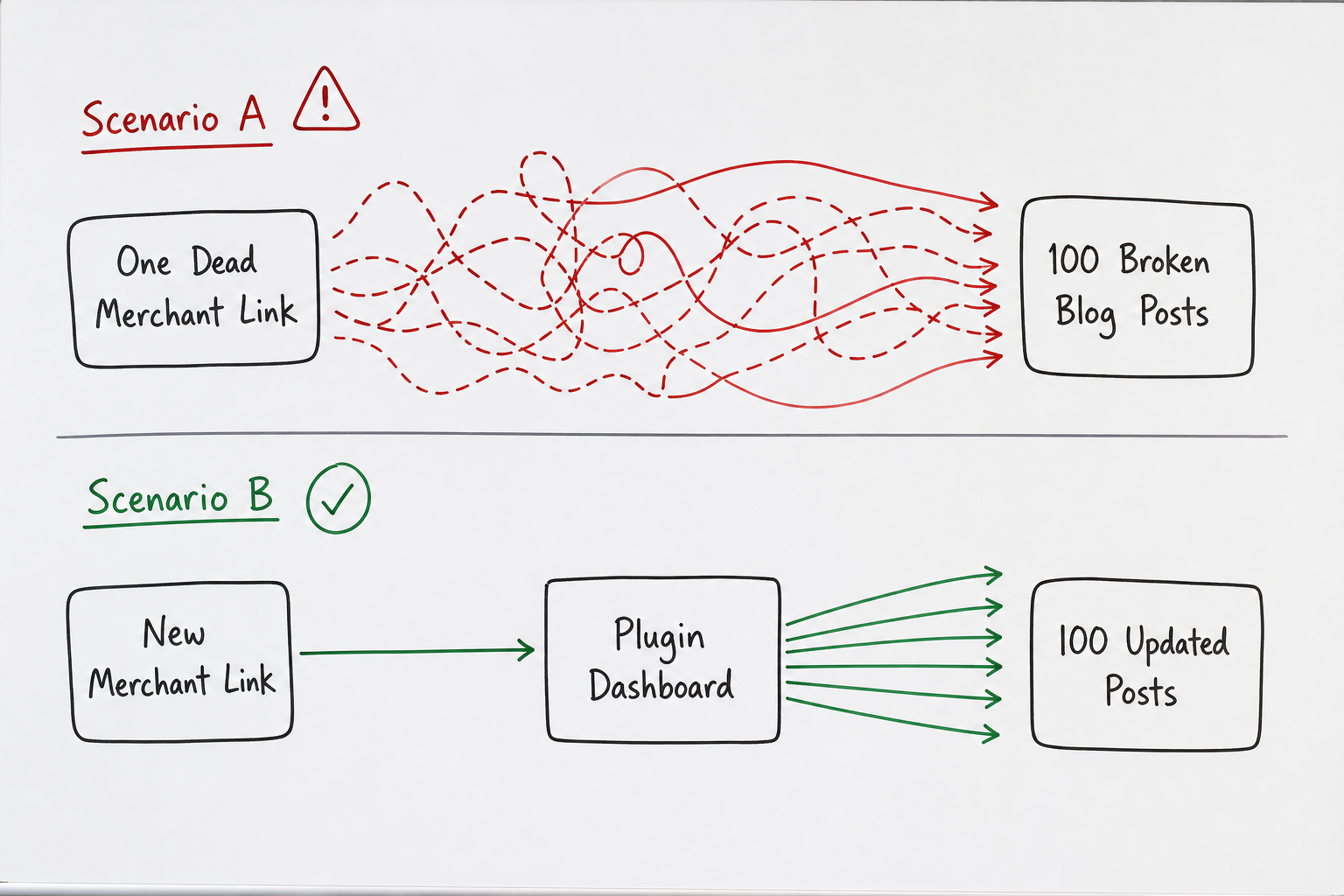
Imagine logging into your affiliate dashboard on a Tuesday morning, expecting to see a fresh batch of commissions, only to realize the high-paying SaaS tool you’ve been promoting just migrated to a new tracking network. Every single link on your site is now dead, leading to a 404 page.
If you have 142 blog posts linking to this tool, and you built your site using native WordPress functionality, you have a 10-hour manual data entry shift ahead of you. You have to hunt down every instance, edit the text block, swap the URL, and update the post.
If you built your site using a proper affiliate plugin stack, fixing this takes exactly fifteen seconds. You update one central field, and all 142 posts instantly route to the new destination.
WordPress is arguably the most powerful platform for building an affiliate business, but out of the box, it is merely a blank canvas. It doesn't know how to track outbound clicks, it doesn't know how to cloak ugly tracking URLs, and it certainly doesn't know how to build high-converting product comparison tables.
Many beginners make the mistake of installing 30 different tools, turning their site into a bloated, slow-loading mess that repels both users and search engines. To run a lean, profitable operation, you only need five specific types of plugins.
Here is the exact plugin stack required to turn a standard WordPress installation into a high-converting affiliate marketing machine.
Why Native WordPress Fails Affiliate Marketers
Before detailing the solutions, it helps to understand exactly where native WordPress falls short for affiliate marketing. If you are reading guides on how to start a profitable affiliate marketing blog, you will quickly learn that content alone does not equal revenue. Infrastructure matters.
Native WordPress fails affiliate marketers in three specific ways:
- Link Rot and Management: Native WordPress forces you to hardcode links directly into the block editor. As highlighted in the opening scenario, when a merchant changes platforms or updates their tracking parameters, you are forced into massive manual update projects.
- Visual Presentation: Text links work, but they rarely maximize conversion rates. Native WordPress lacks the ability to create dynamic product display boxes, pros/cons lists, or sticky comparison tables without custom CSS/HTML knowledge.
- Click Attribution: The WordPress dashboard tells you how many page views you have. It tells you absolutely nothing about how many people clicked your affiliate links, which links they clicked, or what pages drove those clicks. Without this data, you are flying blind.
To solve these problems without slowing down your site, we use a concept called the "Lean Affiliate Stack."
Plugin 1: The Link Manager (ThirstyAffiliates or Pretty Links)
If you install only one plugin from this list, make it a link management and cloaking tool. The two industry standards are ThirstyAffiliates and Pretty Links.
What Link Cloaking Actually Does
An affiliate link typically looks like this: https://merchant.com/?ref=98745&campaign=summer_sale&source=blog.
It is ugly, obvious, and easily stripped by malicious browser extensions. Link cloaking takes that long URL and masks it behind a clean directory on your own domain.
Your new link becomes: https://yourdomain.com/recommends/merchant/.
When a user clicks your clean link, the plugin instantly redirects them (usually via a 301 or 307 redirect) to the ugly tracking link.
Core Advantages of Link Managers
Beyond aesthetics, centralized link management gives you absolute control over your assets.
- Single Point of Failure Resolution: You input the merchant's tracking link into the plugin dashboard once. The plugin generates a shortcode or a cloaked URL. You use that cloaked URL in your 100 blog posts. When the merchant changes their link, you update it in the plugin dashboard, and all 100 posts instantly redirect to the new target.
- Automatic Nofollow and Sponsored Tags: Google requires affiliate links to be marked with
rel="nofollow"orrel="sponsored". Doing this manually for every link is tedious and prone to human error. A link manager automatically applies these tags to every outbound affiliate click globally. - Auto-Linking: Premium versions of these tools allow you to assign a keyword to a link. For example, anytime you type "best email marketing software" in a post, the plugin automatically turns that text into your affiliate link. (Note: use this feature sparingly to avoid spamming your own content).
Configuration Best Practices
When setting up your link manager, set the redirect type to 307 Temporary rather than 301 Permanent. A 301 redirect tells the browser to cache the destination. If you ever change the affiliate link in the future, returning visitors might still be routed by their browser cache to the old, dead link. A 307 redirect forces the browser to check the server every single time, ensuring your audience always lands on the active offer.
Plugin 2: The Display & Conversion Engine (Lasso or AffiliateWP/AAWP)
The era of relying entirely on in-text contextual links is over. While text links are still valuable for users with high intent who are reading every word, the vast majority of web traffic scans content.
To capture scanners, you need visual interruptions: product boxes, feature grids, and comparison tables.
The Shift to Component-Based Affiliate Marketing
Tools like Lasso (ideal for software, digital products, and general web offers) or AAWP (specifically built for the Amazon Associates API) allow you to build high-converting assets without coding.
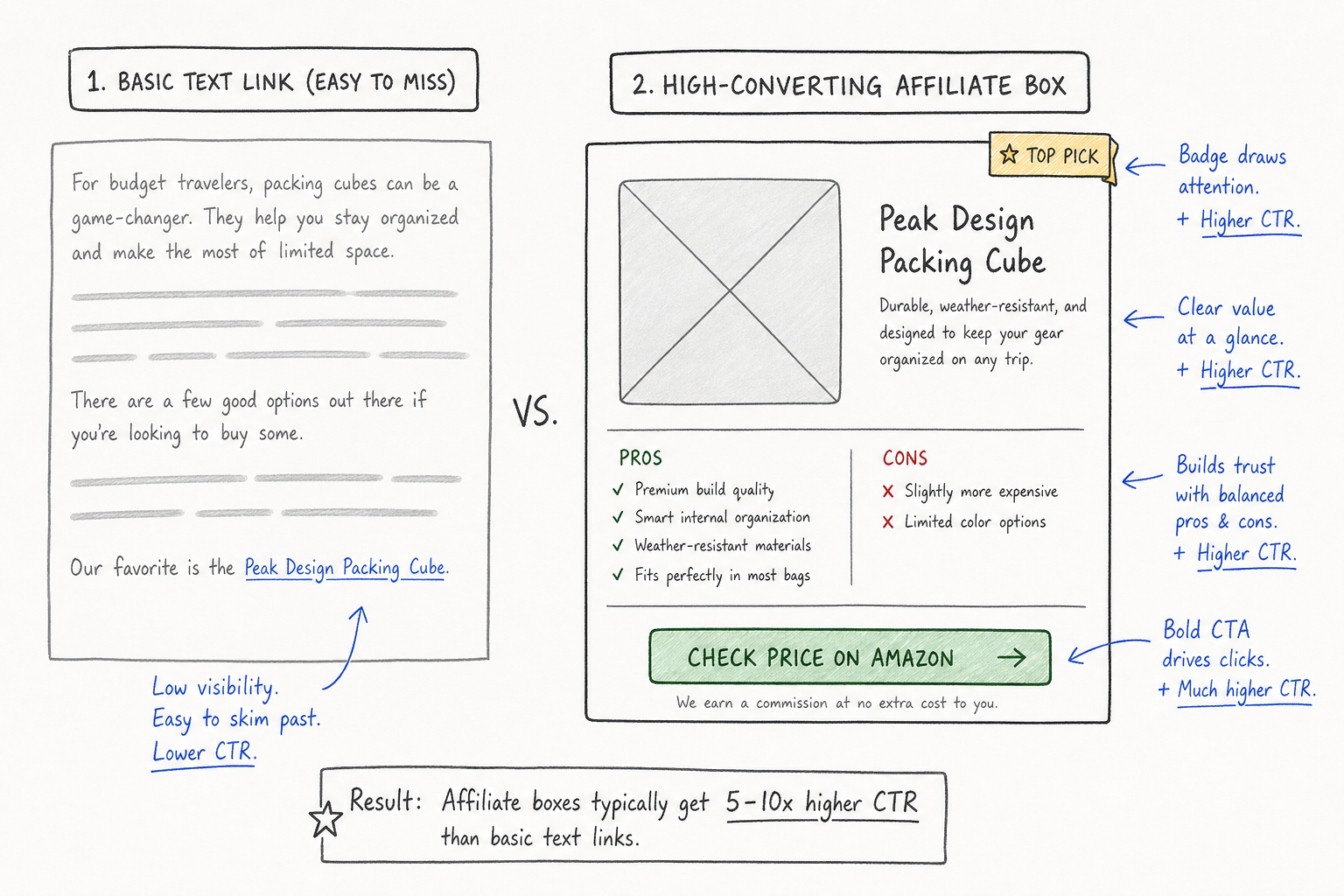
Consider the visual difference and the impact on Click-Through Rate (CTR):
| Element Type | User Behavior | Average CTR Impact | Ideal Placement |
|---|---|---|---|
| Standard Text Link | Often skimmed over unless highly contextual. | Baseline | Mid-paragraph, deep explanations. |
| Standalone Button | Clear call to action, breaks up text. | +15% to 25% | End of a review section. |
| Product Box (with Image, Pros/Cons, Badge) | Stops the scrolling eye. Builds immediate trust. | +40% to 80% | Top of the post (The "Top Pick" placement). |
| Comparison Table | Satisfies "X vs Y" search intent immediately. | +50% to 100% | After the intro in a roundup post. |
Why Specialized Display Plugins Win
You might wonder why you can't just use native WordPress Gutenberg blocks (like Group blocks, Image blocks, and Button blocks) to build these displays. You can, but it is deeply inefficient.
If you build a custom product box using native blocks, and the merchant updates their logo or changes their pricing, you have to manually edit that block.
Plugins like Lasso operate on a hub-and-spoke model. You build the product profile in the Lasso dashboard—uploading the image, writing the pros/cons, and setting the primary affiliate link. Then, you drop a shortcode into your post. If the merchant rebrands, you update the image in the Lasso dashboard, and every product box across your entire site updates instantly.
When you are operating in the best niches for affiliate marketing, such as SaaS or finance, branding changes frequently. Keeping your visual assets accurate is a full-time job without a display engine.
Plugin 3: The SEO Powerhouse (Rank Math or Yoast)
You cannot generate affiliate commissions without targeted traffic. A dedicated SEO plugin is non-negotiable for formatting your content in a way that search engines understand and prioritize.
While Yoast has been the legacy choice for years, Rank Math has emerged as the superior option for affiliate marketers due to its robust built-in Schema generator.
The Role of Schema Markup in Affiliate Marketing
Schema markup is behind-the-scenes code that tells Google exactly what your page is about. For affiliate marketers, standard article schema isn't enough. You need Review Schema and Product Schema.
When you review a piece of HR software or a crypto exchange, you want your search listing to display gold star ratings, pros and cons, and pricing directly in the Google search results. These are called "Rich Snippets," and they drastically improve your organic Click-Through Rate.
Rank Math allows you to append this data visually at the bottom of your post editor.
Key SEO Plugin Configurations
To get the most out of your SEO plugin for an affiliate site, ensure the following settings are strictly enforced:
- Noindex Tag Pages: WordPress automatically creates a new archive page for every tag you use. This creates massive duplicate content issues. Set your SEO plugin to
noindex, followall Tag archives. - Sitemap Generation: Ensure your XML sitemap is actively submitting to Google Search Console. Exclude author archives if you are a single-author blog to save crawl budget.
- Title and Meta Description Templates: Set up dynamic variables so that if you forget to write a custom meta description, the plugin automatically pulls the first paragraph of the post, rather than leaving it blank.
Plugin 4: The Analytics Bridge (MonsterInsights or Site Kit)
Many affiliates log into their affiliate networks (like ShareASale, Impact, or a merchant's private program found on AffiliList) to see their clicks. The problem with network-level data is that it lacks context.
The network tells you that you received 50 clicks yesterday. It does not tell you which blog post drove those clicks, what geographic location the user was from, or whether they clicked the link in the introduction or the conclusion.
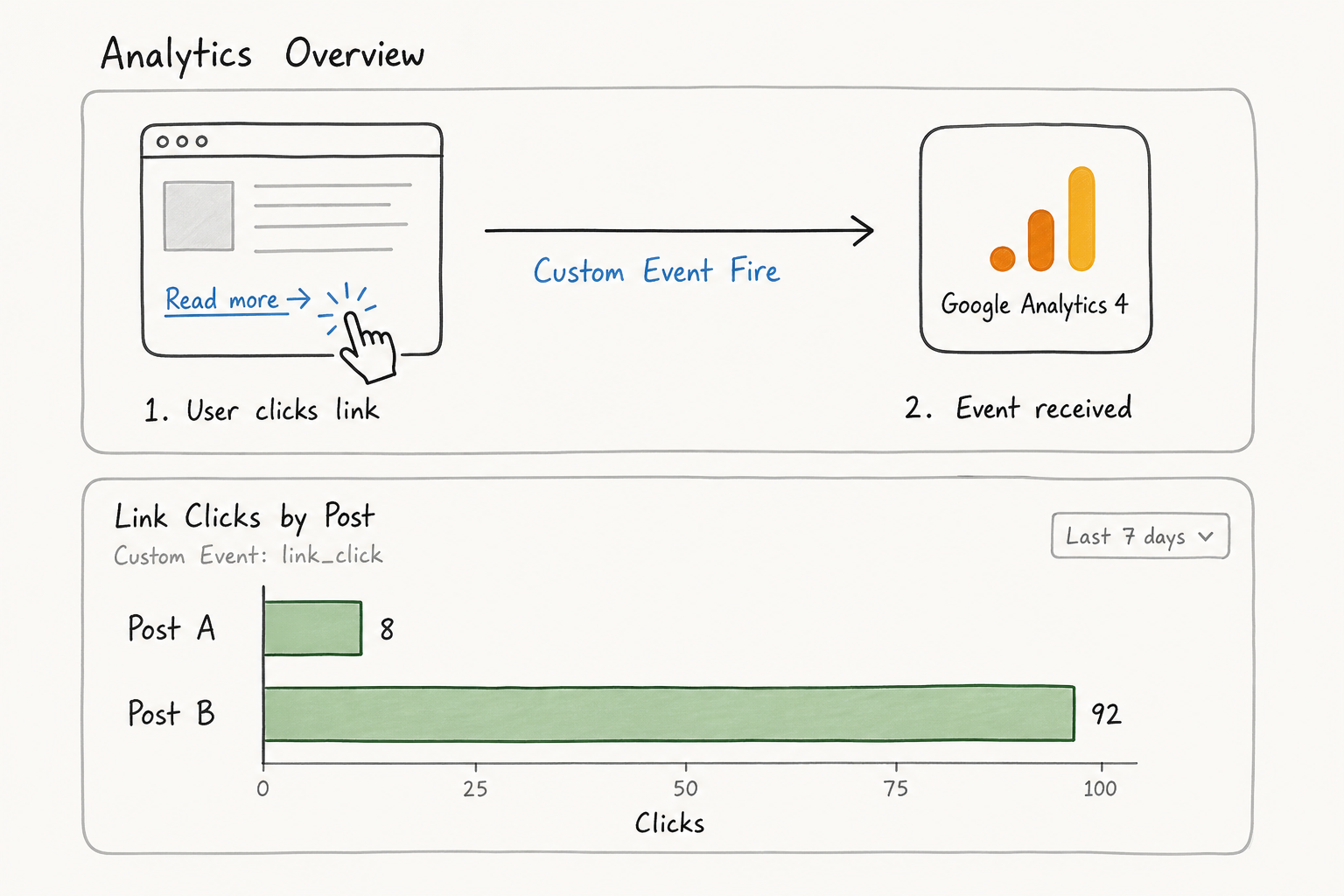
To scale, you need to tie your outbound affiliate clicks to your Google Analytics 4 (GA4) property.
Automating Event Tracking
Setting up custom event tracking in GA4 manually requires Google Tag Manager, custom data layers, and a steep learning curve. Plugins like MonsterInsights or Google's official Site Kit bridge this gap for WordPress users.
With a few clicks, these plugins automatically tag every outbound link click as a custom event in GA4.
How to Use the Data
Once this analytics bridge is established, you can run reports to answer high-value business questions:
- The Conversion Disconnect: If "Post A" generates 1,000 visitors and 10 affiliate clicks (1% CTR), but "Post B" generates 500 visitors and 100 affiliate clicks (20% CTR), you know exactly where to focus your energy. You need to reverse-engineer the formatting of Post B and apply it to Post A.
- Identifying Dead Traffic: You might find that a post ranking well for "what is affiliate marketing" drives massive traffic but zero outbound clicks. This tells you the intent is purely informational. Instead of trying to force a product sale, you should capture those users onto an email list.
Plugin 5: The Performance Optimizer (WP Rocket or FlyingPress)
The final piece of the core stack is performance optimization. Affiliate sites are notoriously heavy. You are running link trackers, display boxes, analytics scripts, and usually loading plenty of high-resolution product screenshots.
If your site takes more than three seconds to load, you are bleeding money. Furthermore, Google uses Core Web Vitals (a set of speed and usability metrics) as a direct ranking factor.
Why Caching is Not Enough
Most free performance plugins (like W3 Total Cache) only handle page caching—saving a static HTML version of your site to serve to visitors faster. While caching is necessary, it doesn't solve the heavy lifting required by modern affiliate sites.
Premium tools like WP Rocket or FlyingPress handle the complex optimizations that actually move the needle on Core Web Vitals:
- Delaying JavaScript Execution: This is the most crucial feature. It prevents third-party scripts (like Google Analytics, Facebook Pixels, or live chat widgets) from loading until the user actually interacts with the page (scrolls or moves the mouse). This drastically improves your initial page load time.
- Removing Unused CSS: WordPress themes often load massive stylesheets where you only use 10% of the code. These plugins scan your page, extract only the CSS needed to render the visible content, and defer the rest.
- Lazy Loading Images and Iframes: Images below the fold (ones the user hasn't scrolled to yet) will not load until the user approaches them, saving massive amounts of initial bandwidth.
The Implementation Framework: Launching a Campaign
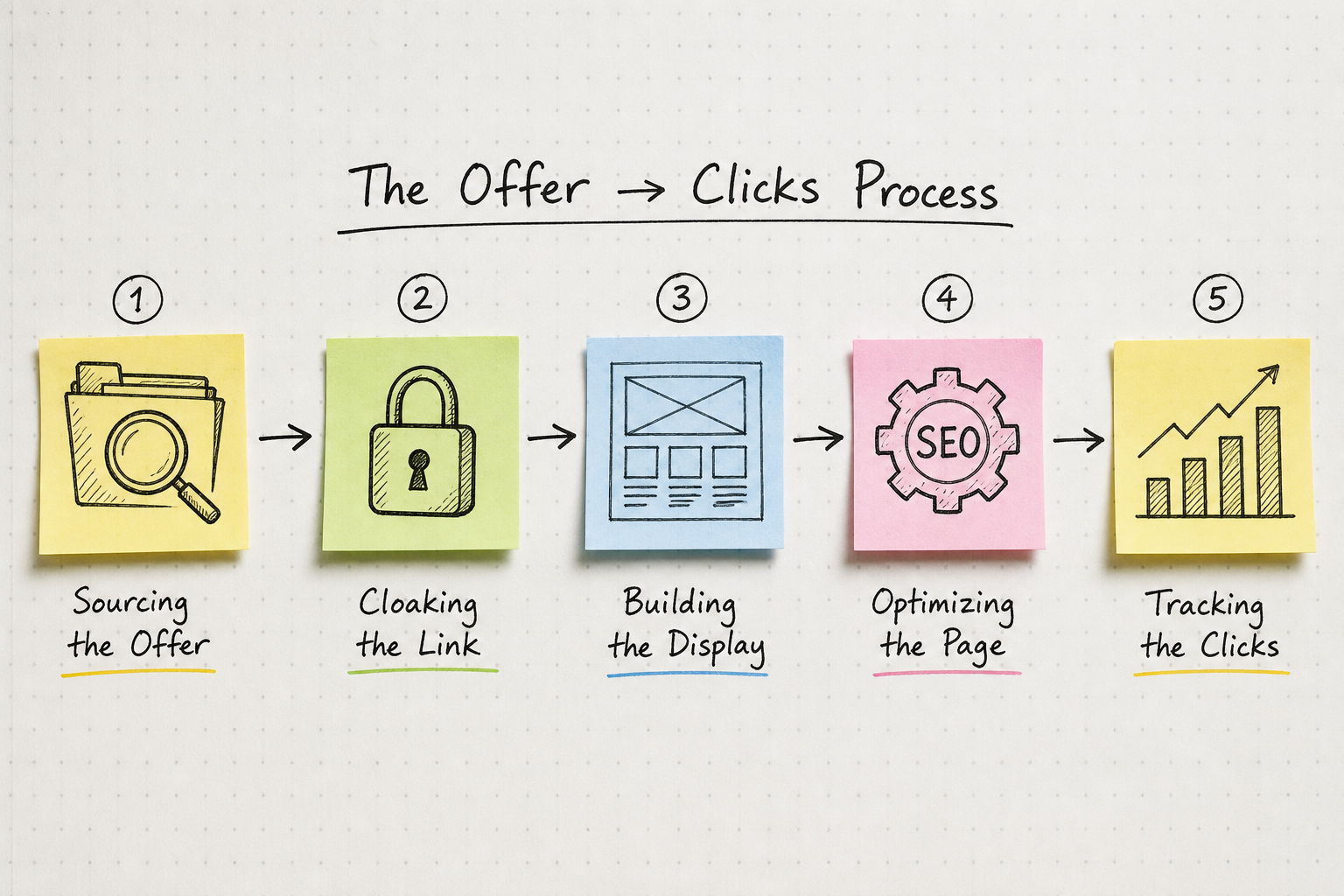
Having the plugins is step one. Knowing how they interact during a live campaign is step two. When you are ready to target one of the most profitable affiliate marketing niches, follow this 5-step implementation workflow.
Step 1: Source and Secure the Offer
Before touching WordPress, you need a highly competitive offer. Sifting through Google for individual programs often yields outdated commission rates or closed programs.
Leverage an aggregated directory. AffiliList maintains a curated database of over 10,000 programs, heavily focused on SaaS, finance, and digital tools. Look for programs offering recurring commissions or high CPA payouts. Review the terms clearly (cookie duration is just as important as the commission percentage). For deeper strategy on program selection, review these 11 high paying affiliate programs for $500+ commissions.
Step 2: Route the Link Through Your Manager
Once approved, take your raw tracking link from the merchant and immediately paste it into ThirstyAffiliates or Pretty Links.
- Action: Create your cloaked URL (e.g.,
yoursite.com/go/software-name). - Action: Apply a relevant category tag (e.g., "Email Marketing Tools") within the plugin. This keeps your dashboard organized when you have 200+ links.
Step 3: Build the Visual Assets
Do not paste the text link directly into the WordPress editor yet. Open your display plugin (Lasso/AAWP).
- Action: Create a new product display.
- Action: Write a punchy 2-sentence description, list three core pros, and one notable con. (Including a con builds trust. No product is perfect).
- Action: Set the CTA button to use the cloaked link you generated in Step 2.
Step 4: Construct the Content and Optimize On-Page
Draft your review or roundup post.
- Action: Place your new visual product box immediately after your introduction. Don't make users scroll 1,000 words to find your top recommendation.
- Action: Scroll down to the Rank Math/Yoast meta box. Inject "Review" schema, detailing the price point and your 1-to-5 star rating of the software.
Step 5: Verify the Tracking Bridge
Publish the post and open an incognito browser window.
- Action: Click your own affiliate button.
- Action: Open Google Analytics 4 in real-time view. Verify that the "outbound_link_click" event fired successfully. If it did, your infrastructure is sound, and you are ready to drive traffic.
Common Technical Pitfalls to Avoid
Even with the perfect plugin stack, human error can sabotage an affiliate site. Watch out for these three common failure modes.
1. The Over-Automation Trap
Link management plugins offer an "auto-link" feature where every instance of a specific word is converted into an affiliate link. If you set the word "marketing" to auto-link to a HubSpot offer, your site will quickly become unreadable, littered with blue hyperlinks on every other line.
If you use auto-linking, cap it strictly. Set the plugin rules to only link the first instance of a keyword per post, and exclude headings completely.
2. Ignoring Legal Disclosures
The Federal Trade Commission (FTC) requires clear and conspicuous disclosures when a post contains affiliate links. Burying a generic disclaimer on a separate "Privacy Policy" page is no longer compliant.
Your display plugins and link managers do not automatically write disclosures for you. You must ensure a disclaimer sits at the very top of your blog post, before any affiliate links appear. Many theme frameworks or simple hook plugins allow you to inject a global disclaimer block under the post title automatically.
3. Trusting Free Speed Optimization Blindly
If you install a free caching plugin and check all the boxes without testing, you will likely break your site. JavaScript minification often breaks complex mobile menus and interactive tables.
Whenever you tweak your performance plugin (WP Rocket/FlyingPress), immediately test your site on a mobile device. Ensure dropdown menus work, product images load, and your affiliate buttons are actually clickable. Speed is useless if the site is functionally broken.
Evaluating the Cost: Free vs. Premium Tiers
A common question from new site owners exploring the affiliate marketing side hustle is whether they need the paid versions of these plugins.
You can start with a 100% free stack, but you will hit friction points quickly.
- Pretty Links / ThirstyAffiliates: The free versions handle basic cloaking perfectly. You only need premium for auto-keyword linking and advanced geographic routing (sending UK traffic to a different offer than US traffic).
- Rank Math / Yoast: Free is entirely sufficient for your first 50 posts. Premium becomes necessary when you want advanced Schema types and multi-keyword tracking.
- Lasso / Display Plugins: There are no great free alternatives here. Building custom Gutenberg blocks is too slow. A premium display plugin is usually the first financial investment you should make after hosting.
- WP Rocket: Paid only, but the return on investment in time saved versus configuring complex free plugins like W3 Total Cache is immense.
Next Steps for Your Affiliate Platform
WordPress is not an affiliate marketing platform by default. It is a highly customizable engine that requires the right parts to function.
By installing a dedicated link manager, a visual display engine, an SEO optimizer, an analytics bridge, and a caching powerhouse, you transform a basic blog into a tracked, highly-convertible asset.
Your infrastructure is now capable of handling traffic. The next phase is finding the right partners to promote. Stop wasting time with fragmented Google searches and outdated network terms. Use directories like AffiliList to browse verified, high-converting programs across hundreds of specific niches, and plug those offers directly into your new, optimized WordPress stack.