
5 Affiliate Tracking Tools to Stop Losing Commissions
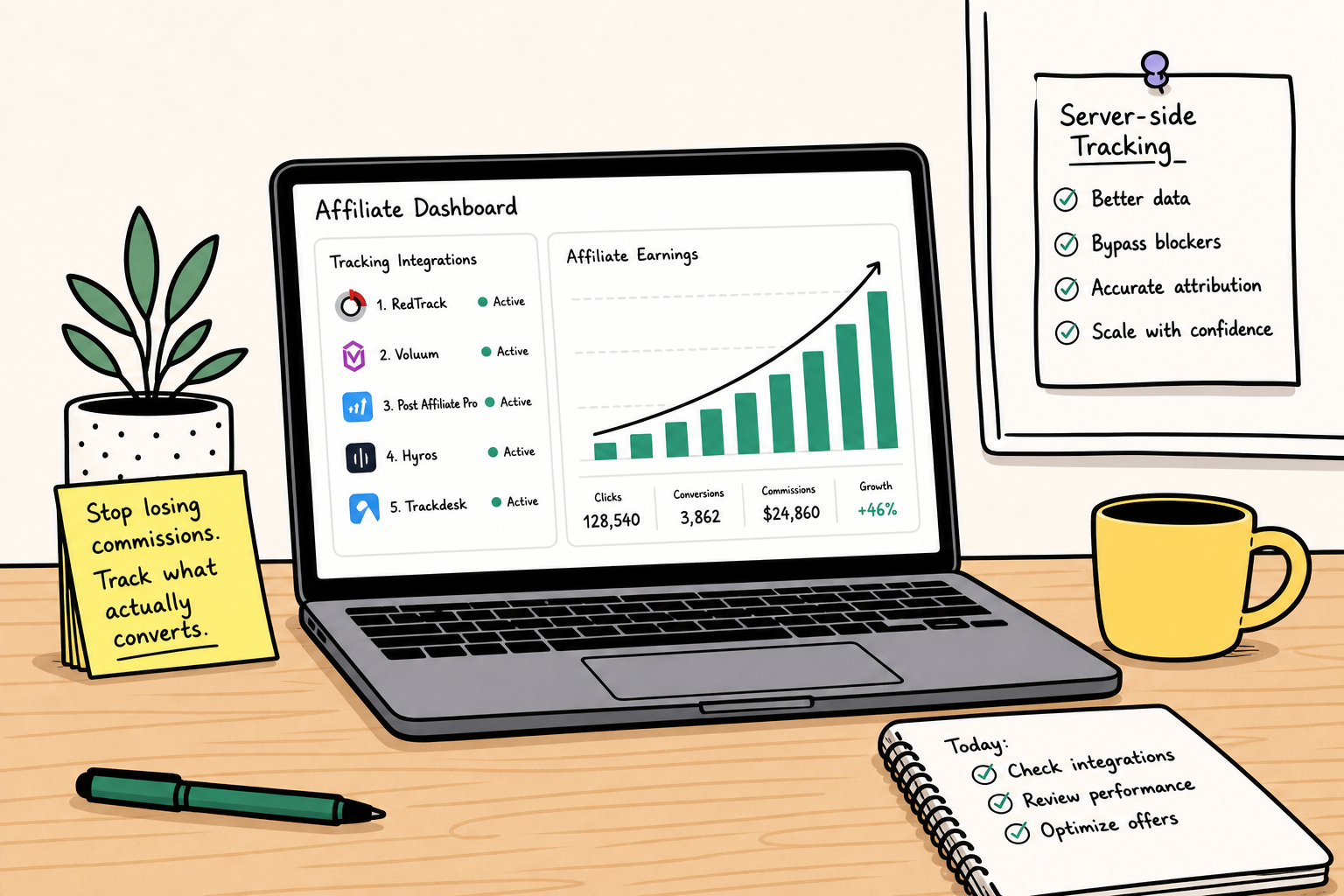
Stop losing your affiliate commissions to ad blockers and broken links. Discover the 5 best affiliate tracking tools for server-side attribution and scaling.
- The Anatomy of a Lost Commission: 5 Silent Leaks
- Client-Side vs. Server-to-Server (S2S) Tracking Explained
- How to Choose Your Affiliate Tracking Infrastructure
- 1. AnyTrack: The API Bridge for Google and Meta Ads
- 2. WeCanTrack: The Portfolio Aggregator for Niche Publishers
- 3. RedTrack: The Privacy-First Hub for Media Buyers
- 4. Voluum: The Programmatic Router for Arbitrage
- 5. ClickMagick: The Cross-Device Tracker for Solo Creators
- Step-by-Step: The Commission Recovery Audit
- Frequently Asked Questions
- Final Thoughts
You log into your affiliate dashboard on a Monday morning. The weekend traffic data from Google Analytics shows 5,000 unique visitors and hundreds of outbound clicks to your top recommended software product. You refresh the merchant's reporting page, expecting to see a corresponding spike in earnings.
The dashboard reads: 2 clicks, 0 conversions.
What exactly happened to those buyers?
Assuming the merchant is operating honestly, the most likely culprit is your own tracking infrastructure. If you are copying and pasting standard affiliate links directly into your content or paid ads, you are actively burning revenue. Modern web browsers block third-party cookies by default. Aggressive ad blockers strip tracking parameters from URLs. Affiliate networks sunset old offers without notifying publishers, leaving high-traffic review pages pointing to dead 404 errors.
Graduating from a basic affiliate marketing side hustle to a resilient digital business requires treating your attribution data like a financial asset. Finding a highly profitable partner program on AffiliList is only the first step in monetization. If you cannot definitively attribute a sale to the exact article, ad creative, or email sequence that generated it, you cannot optimize your campaigns. You are flying blind.
This guide breaks down the exact mechanics of why commissions disappear and provides a technical teardown of five affiliate tracking tools designed to recover that lost revenue through server-side tracking, link aggregation, and automated link monitoring.
The Anatomy of a Lost Commission: 5 Silent Leaks
Before you can choose the right software to protect your earnings, you need to understand exactly how those earnings are slipping away. The internet ecosystem has shifted heavily toward privacy, and the collateral damage of this shift is the traditional affiliate tracking cookie.
Here are the five primary ways your tracking fails without dedicated software.
1. Intelligent Tracking Prevention (ITP) and Cookie Death
Apple's Safari browser commands a massive share of mobile web traffic. Safari utilizes Intelligent Tracking Prevention (ITP). This is a strict privacy protocol that aggressively limits the lifespan of cookies.
In the past, an affiliate cookie might last 30 to 90 days. If a user clicked your link, thought about the purchase for a week, and then bought the product, you received the commission. Under ITP, third-party cookies are blocked entirely, and even first-party tracking cookies are often restricted to a 24-hour or 7-day lifespan. If a user takes eight days to convert, the network registers an organic sale for the merchant. You receive zero credit.
2. The Cross-Device Disconnect
Consumer behavior is rarely linear. A potential buyer might read your software review on their iPhone during their morning commute and click your affiliate link. Later that evening, they sit down at their desktop computer, type the brand name directly into Google, and complete the purchase.
Because the initial click happened on a mobile browser and the purchase happened on a desktop browser, the merchant's standard tracking platform sees two completely different users. The attribution chain breaks.
3. Network Link Rot and Expired Offers
Affiliate managers frequently restructure their programs. They might migrate from ShareASale to Impact, deprecate an old product tier, or pause an offer temporarily. When this happens, your previously valid affiliate links redirect to generic homepages or dead error screens.
If you manage a portfolio of niche sites with thousands of outbound links, manually checking every URL is impossible. You will continue sending highly qualified, expensive traffic to broken endpoints until you accidentally discover the error months later.
4. Coupon Site Hijacking
A user reads your comprehensive, 3,000-word product comparison. You convinced them to buy. They click your link, add the item to their cart, and reach the checkout page. Right before paying, they notice a box labeled "Promo Code."
They open a new tab, search for "[Brand Name] promo code," and click on a massive coupon aggregator site. That coupon site drops its own affiliate cookie, immediately overwriting yours. The user pastes a meaningless code into the checkout box and buys the product. The coupon site steals the entire commission for a sale you generated. Advanced tracking setups can help you identify exactly where this drop-off occurs, allowing you to negotiate locked-attribution codes with your merchant partners.
5. Network Discrepancies and "Shaving"
If you are wondering is affiliate marketing legit, you will inevitably encounter the concept of "shaving." Shaving occurs when a network or merchant intentionally or accidentally fails to report valid conversions to save on payout costs.
When you rely 100% on the merchant's dashboard, you have no leverage. You have no independent proof of the traffic volume and click quality you delivered. Third-party tracking tools act as your independent auditing firm, logging every single click ID and user session on your own server.
Client-Side vs. Server-to-Server (S2S) Tracking Explained
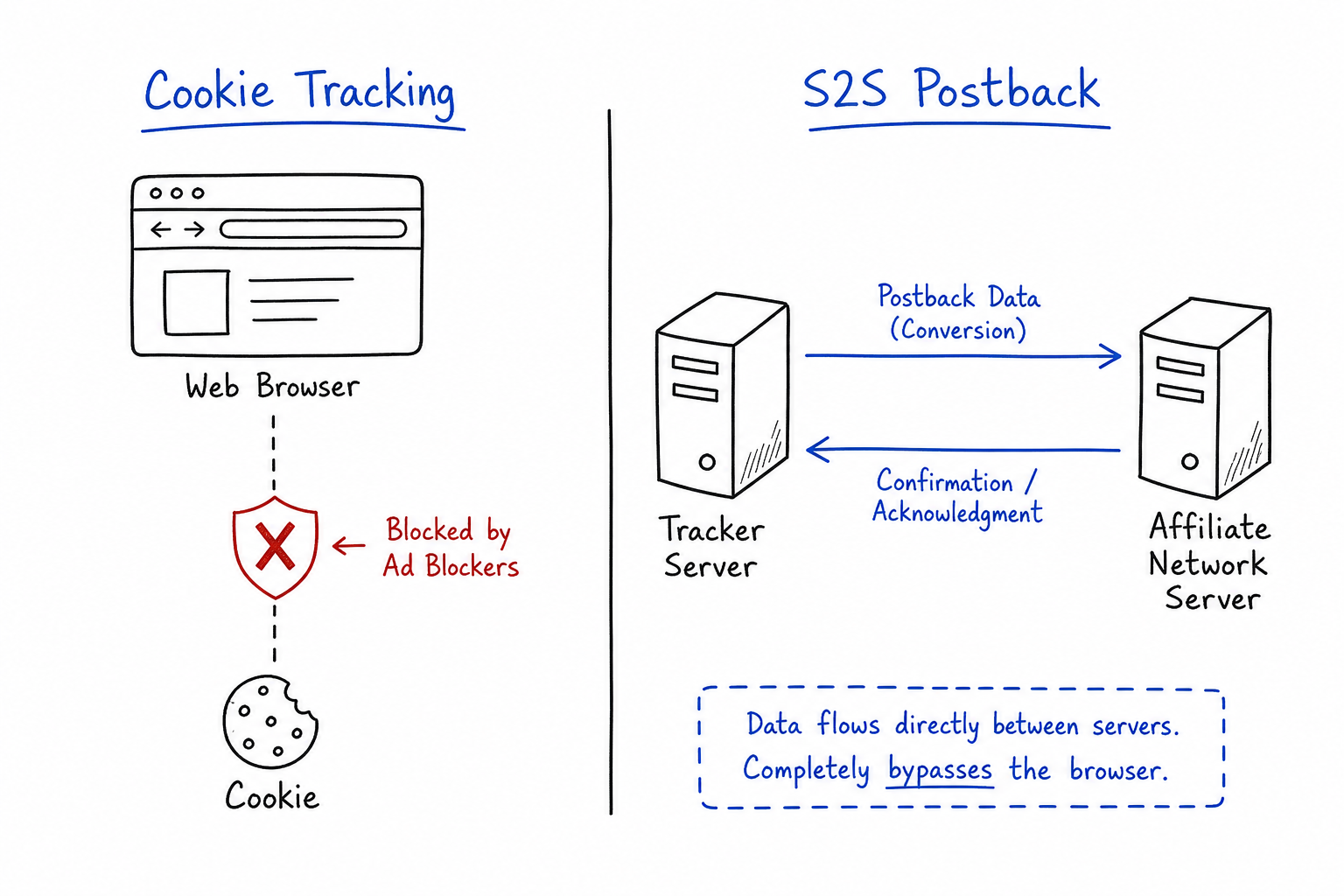
The entire affiliate industry is rapidly migrating away from client-side tracking toward Server-to-Server (S2S) tracking. Understanding this technical distinction is the key to stopping commission leaks.
The Failure of Client-Side (Pixel) Tracking
Client-side tracking relies on the user's web browser. When a user clicks your link, a small piece of code (a pixel) fires, placing a text file (a cookie) in their browser cache. When the user reaches the "Thank You" page after buying, another pixel fires, reads the cookie, and credits your account.
This method is highly fragile. Ad blockers block the pixel. Browsers delete the cookie. Slow internet connections cause the page to load before the pixel can fire. Client-side tracking is no longer sufficient for serious marketers.
The Reliability of Server-to-Server (S2S) Tracking
Server-to-Server tracking bypasses the user's web browser entirely. It relies on direct database communication between your tracking software and the affiliate network's backend.
Here is the exact step-by-step mechanics of an S2S transaction:
- The Click: A user clicks your tracked link.
- The Click ID: Your tracking software generates a unique, randomized alphanumeric string for that specific interaction (e.g.,
ClickID=99887766). - The Handoff: The user is redirected to the merchant. The Click ID is appended to the URL and passed to the merchant's server.
- The Conversion: The user buys the product.
- The Postback: The merchant's server automatically sends a direct web-request (a postback URL) to your tracking server. The message contains the exact Click ID and the commission amount.
Because this communication happens between two secure servers in the background, ad blockers cannot see it. ITP cannot block it. Cookies are completely irrelevant. If you promote high paying affiliate programs where a single lost conversion costs you $500 or more, S2S tracking is a mandatory infrastructure upgrade.
How to Choose Your Affiliate Tracking Infrastructure
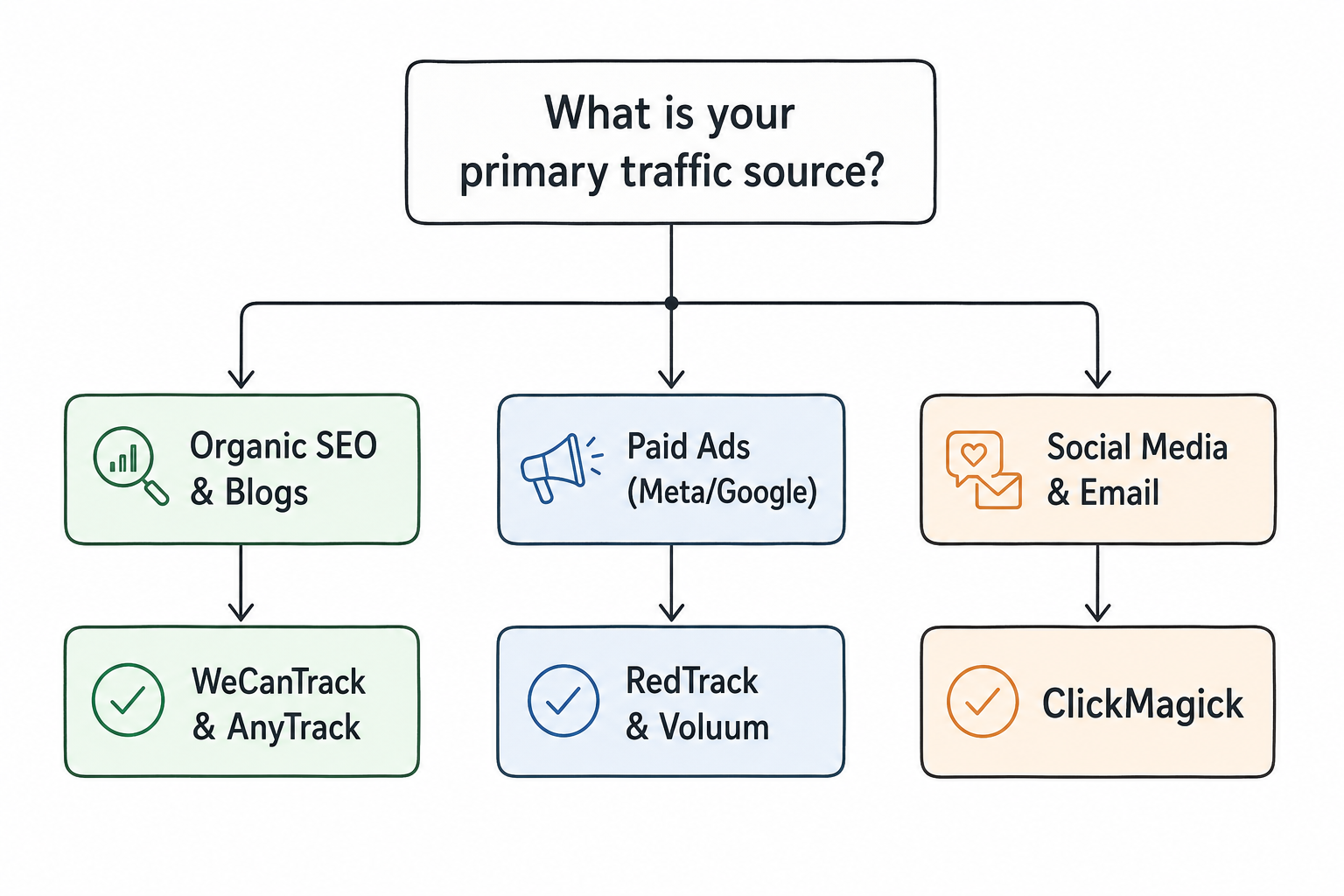
There is no single "best" tool on the market. The software you choose depends entirely on how you acquire traffic and the specific technical requirements of your niche.
 When evaluating these tools, you must consider three primary criteria:
- Traffic Source: Are you relying on organic SEO, buying ads on Meta and Google, or driving traffic through social media? Paid media buyers need rapid programmatic routing, while SEOs need robust content link aggregation.
- Network Integrations: Do you promote direct SaaS programs, or do you rely on massive aggregator networks like CJ Affiliate, Awin, and Impact?
- Attribution Complexity: Do you need to track recurring monthly subscriptions, or are you strictly dealing with one-time CPA (Cost Per Action) payouts? The best niches for affiliate marketing (SaaS & digital) often involve recurring revenue, which requires tracking tools capable of logging lifetime value (LTV) postbacks.
Here are the five best tools tailored for specific operational styles.
1. AnyTrack: The API Bridge for Google and Meta Ads
AnyTrack is designed specifically to bridge the data gap between affiliate networks and major ad platforms. According to their own technical documentation, AnyTrack's primary mission is to give affiliate marketers the same algorithmic advantages that direct-to-consumer e-commerce brands enjoy.
Best For
SEOs, bloggers, and paid media buyers who rely heavily on Google Analytics 4 (GA4), Google Ads, and the Meta Conversions API.
How It Stops Commission Leaks
When you run paid ads to an affiliate offer, the ad platform needs conversion data to optimize the campaign. Because you do not own the merchant's "Thank You" page, you cannot install your Facebook Pixel or Google Tag there. This means your ad account registers clicks but no sales, preventing the algorithm from finding more buyers.
AnyTrack solves this by acting as a central API hub. It connects to your affiliate networks via postback URLs. When a conversion happens, the network pings AnyTrack. AnyTrack then formats that conversion data and fires it directly into GA4 and the Meta Conversions API via server-side events.
Core Features and Workflow
- Auto-Tagging: You simply add one line of JavaScript to the header of your website. AnyTrack automatically detects all outbound affiliate links and appends the necessary
subidtracking parameters dynamically. - 100+ Native Integrations: It features pre-built API connections for major networks like ClickBank, ShareASale, and Rakuten. You do not have to manually configure complex postback macros.
- First-Party Audience Building: By routing all conversion data back into Google and Meta, you can build highly accurate lookalike audiences based on actual purchasers, rather than just link-clickers.
Tradeoffs
AnyTrack is deeply intertwined with the Google/Meta ecosystem. If you run your business purely on dark social traffic or raw media buys on obscure ad networks, you may find the feature set heavily skewed toward mainstream search and social platforms.
2. WeCanTrack: The Portfolio Aggregator for Niche Publishers
If you manage a large content portfolio, logging into 15 different affiliate networks every morning to manually aggregate your earnings in a spreadsheet is an enormous waste of time. WeCanTrack is built explicitly for content publishers to solve this administrative nightmare.
Best For
Content creators, niche site operators, and media companies managing hundreds of blog posts across multiple different affiliate networks.
How It Stops Commission Leaks
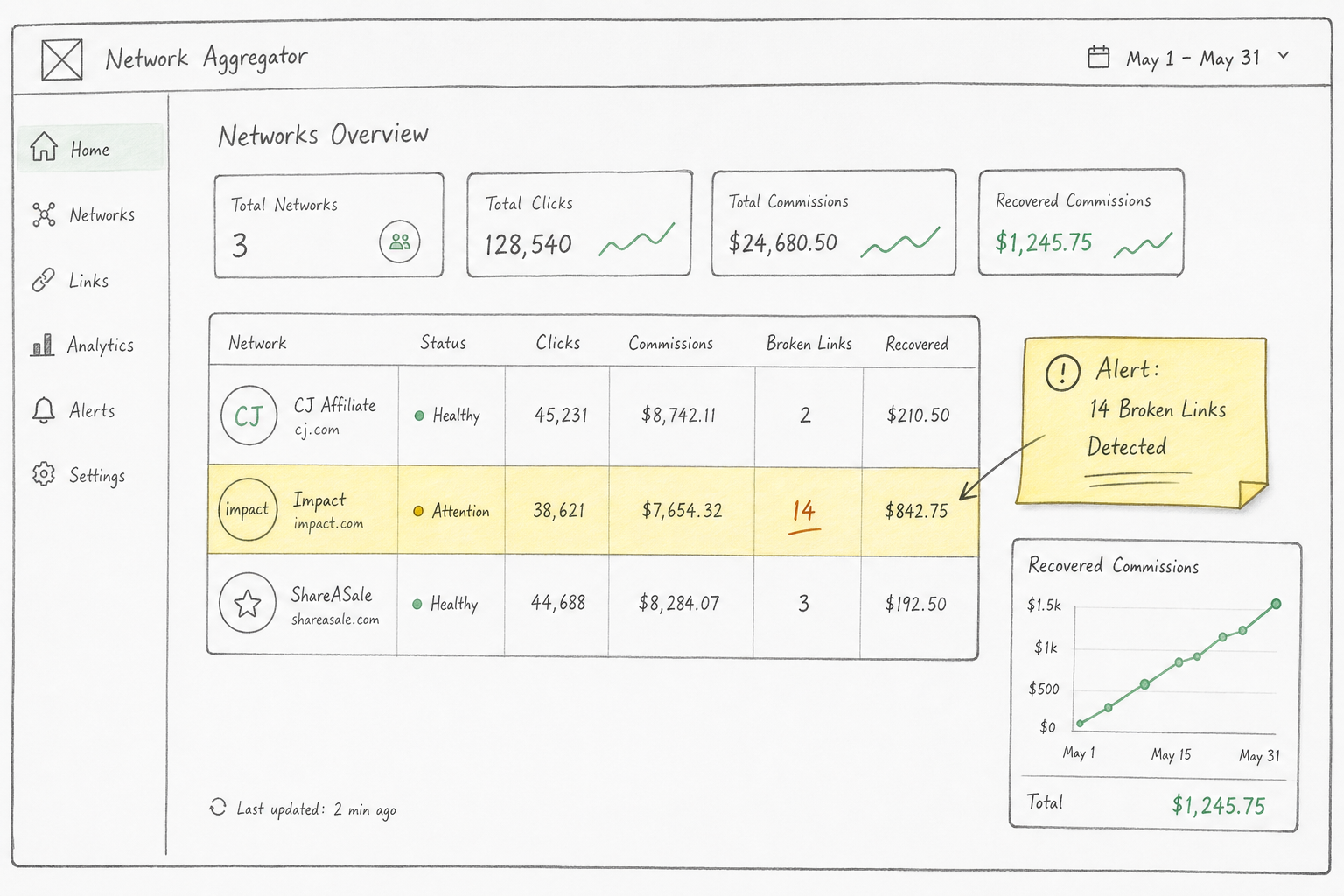
WeCanTrack operates as a massive data scraper and API aggregator. It pulls transaction data from over 300 different affiliate networks and merges it into a single, unified dashboard.
More importantly, WeCanTrack features automated link monitoring. If you want to start a profitable affiliate marketing blog, tracking broken links is the highest ROI activity you can perform. When an affiliate program goes offline, or a specific product goes out of stock, WeCanTrack alerts you immediately. You can swap the link across your entire site before you lose days of potential revenue.
Core Features and Workflow
- Data Aggregation: Connects via API or automated scraping to pull impressions, clicks, and conversions into one view.
- Google Analytics Integration: It pushes conversion data directly into GA4, allowing you to see exactly which specific blog post and which specific keyword drove the affiliate sale.
- Network Uptime Monitoring: Automatically flags dead links, expired offers, and merchant platform migrations.
Tradeoffs
WeCanTrack is a reporting and aggregation tool, not a real-time traffic router. It is built for SEOs and content publishers who rely on organic traffic. It lacks the millisecond routing capabilities required for high-volume paid media arbitrage.
3. RedTrack: The Privacy-First Hub for Media Buyers
RedTrack is an advanced, enterprise-grade ad tracking platform. As highlighted in their own guides on affiliate tracking software, the platform is engineered specifically to handle complex media buying operations in a post-cookie environment.
Best For
Media buyers, ad agencies, and advanced affiliates running paid traffic campaigns across TikTok, Google, Meta, and native ad networks (like Taboola or Outbrain).
How It Stops Commission Leaks
RedTrack operates entirely on Server-to-Server (S2S) postback tracking. It generates a proprietary Click ID for every single ad impression and click. When a user navigates from your TikTok ad, to your presell advertorial, and finally to the merchant's checkout page, RedTrack maintains an unbreakable chain of custody over that user's session.
If the user converts, the merchant fires the postback to RedTrack. RedTrack then attributes that exact dollar amount back to the specific TikTok ad creative, ad set, and campaign that initiated the journey.
Core Features and Workflow
- Cookieless Architecture: Built from the ground up to survive iOS updates and strict ITP browser protocols.
- Multi-Touch Attribution: Unlike basic trackers that only credit the final click, RedTrack can show you the entire user journey. You might discover that a user clicked a Google Ad on Tuesday, but didn't buy until they clicked a retargeting ad on Friday.
- Custom Postback Macros: Provides extreme granular control over data passing. You can map complex variables (like
{device_type}or{geo}) directly into your affiliate links.
Tradeoffs
The learning curve is exceptionally steep. Configuring custom postbacks requires a solid understanding of URL parameters, macros, and webhook logic. If you are intimidated by technical documentation, RedTrack will feel overwhelming.
4. Voluum: The Programmatic Router for Arbitrage
Voluum is the undisputed heavyweight champion of the performance affiliate marketing space. It is designed to handle millions of clicks per day with zero latency. It is less of a simple reporting dashboard and more of a real-time traffic control center.
Best For
High-volume media buyers, traffic arbitragers, and affiliates running campaigns on push notifications, pop-unders, and native ads.
How It Stops Commission Leaks
Voluum stops commission leaks through intelligent, AI-powered traffic routing. When you buy cheap, high-volume traffic, conversion rates fluctuate wildly. If an affiliate offer server goes down, or the merchant lowers their payout rate, you can burn through thousands of dollars in ad spend in a matter of hours.
Voluum utilizes an automated Traffic Distribution AI. It constantly analyzes the Earnings Per Click (EPC) and conversion rates of various offers in your campaign. If your primary offer stops converting, Voluum automatically redirects incoming traffic to a backup offer in real-time. You never send paid clicks to a dead page.
Core Features and Workflow
- Traffic Distribution AI: Automatically optimizes campaigns by weighting traffic toward the highest-performing landing pages and offers.
- Anti-Fraud Kit: High-volume traffic sources are notoriously plagued by bot traffic. Voluum analyzes incoming clicks in real-time and flags suspicious IP addresses, fast-clickers, and known botnets before you pay for them.
- Rule-Based Targeting: You can set rules to route traffic based on device type. For example, iOS users are sent to an App Store install offer, while Android users are sent to a Google Play offer, maximizing conversion efficiency.
Tradeoffs
Voluum is expensive. It is priced for affiliates who are already generating significant revenue. The interface and feature set are overkill for a standard blogger or content creator.
5. ClickMagick: The Cross-Device Tracker for Solo Creators
ClickMagick has built a strong reputation as the "Swiss Army Knife" of tracking tools. It focuses heavily on direct response marketers, solo creators, and those building robust email lists.
Best For
Email marketers, YouTube creators, and social media affiliates who need reliable link cloaking and cross-device tracking.
How It Stops Commission Leaks
ClickMagick excels at solving the cross-device drop-off problem. If you are focused on setting up affiliate marketing on Pinterest, you know that social media traffic is predominantly mobile. Users browse Pinterest on their phones, save your pins, but often complete the actual software purchase later on their laptops.
ClickMagick uses proprietary TrueTracking technology to bridge this gap. By utilizing a mix of server-side data, deterministic fingerprinting, and first-party data profiles, it can often match a desktop conversion to an initial mobile click, securing a commission that standard network tracking would lose.
Core Features and Workflow
- TrueTracking: Their flagship attribution model designed specifically to combat the data loss caused by the iOS 14 update.
- Bot Filtering: Automatically filters out clicks from search engine crawlers and malicious bots, ensuring your conversion rate metrics are accurate.
- Split Testing: Includes built-in A/B testing capabilities. You can route 50% of your email list to one merchant and 50% to another to determine which yields the highest EPC.
Tradeoffs
The user interface feels dated compared to newer tools like AnyTrack or RedTrack. However, the underlying technology is highly reliable, making it a staple for direct-response marketers.
Step-by-Step: The Commission Recovery Audit
Choosing a tool is only half the battle. Implementing it correctly requires rigorous testing. A single misconfigured postback URL can result in zero tracked data.
Before scaling any campaign, perform this four-step commission recovery audit on your new tracking infrastructure.
Step 1: Verify Your Click ID Mapping
Every tracking tool uses a specific "macro" (a placeholder code) to generate a Click ID. Every affiliate network has a specific parameter where they accept that Click ID.
For example, your tracker might generate a Click ID using {clickid}. ShareASale requires you to pass custom data using the afftrack parameter. Your final tracking link must look like this: https://shareasale.com/r.cfm?b=123&u=456&afftrack={clickid}.
If you mismatch these parameters (e.g., sending {clickid} to a network that requires s1), the data will drop.
Step 2: Fire a Test Conversion
Never assume S2S tracking works out of the box. Generate a live click through your tracking link. Note the exact Click ID generated in your tracker's dashboard.
Next, perform a manual test conversion. (Many SaaS programs allow you to trigger a free trial for testing purposes). Check the merchant's dashboard. Verify that your specific Click ID appears in their sub-ID reporting column.
Step 3: Check the Postback Logs
Once the network registers the test conversion, check your tracking tool's postback logs. Did the network's server ping your server? Did it pass the correct payout amount? If the log shows an error (like a 404 or 403 status code), your postback URL is formatted incorrectly or blocked by a firewall.
Step 4: Audit Mobile Responsiveness
Open your tracking link on a mobile device disconnected from Wi-Fi (using cellular data). Ensure the redirect happens seamlessly. Some poorly configured trackers introduce a 2-3 second latency during the redirect process. In the affiliate space, a 3-second delay will cause a massive bounce rate, killing your commissions before the user even sees the offer.
Frequently Asked Questions
Are paid affiliate trackers worth the cost for beginners?
If you are making less than $500 per month, a paid tracker might cut too deeply into your margins. Stick to organic content and basic network reporting. However, the moment you begin spending money on paid ads, or the moment your content portfolio exceeds 50 articles, a tracking tool pays for itself by recovering lost links and enabling algorithmic optimization.
Will Google Analytics 4 (GA4) replace affiliate trackers?
No. GA4 is an analytics platform, not an affiliate tracker. GA4 cannot track off-site conversions (purchases made on the merchant's website) unless you use a bridge tool like AnyTrack to send the server-side data back into Google. Furthermore, GA4 samples data and delays reporting, whereas dedicated affiliate trackers log real-time, unsampled click data.
What is a Click ID (SubID)?
A Click ID is a unique, randomly generated string of characters assigned to a single user interaction by your tracking software. It acts as a digital fingerprint for that specific click. When a purchase occurs, the Click ID allows your software to match the revenue back to the exact traffic source, ad creative, and time of day the click occurred.
Final Thoughts
The digital landscape has grown entirely unforgiving to lazy tracking setups. Relying solely on a merchant's dashboard is a massive operational risk. Apple's privacy updates, aggressive ad blockers, and network link rot will continue to erode the effectiveness of traditional cookies.
Taking ownership of your data is the defining characteristic of a professional affiliate marketer. Whether you choose AnyTrack to feed Google's algorithm, WeCanTrack to monitor your blog portfolio, or RedTrack to scale your media buying, implementing server-side tracking is the most reliable way to ensure you get paid for every single sale you drive.