
Competitors of Lasso for Finding Affiliate Links Evaluation Checklist
Evaluate the top competitors of Lasso for managing and finding affiliate links. Explore database impact, Amazon API rules, and safe migration strategies.

- The Core Problem with Affiliate Plugin Migration
- The Citable Evaluation Framework
- Direct Layout and Display Competitors
- The Amazon-Specific Giants
- The "Hidden" Costs of Affiliate Link Management
- Beyond the Tool: Finding the Right Links to Manage
- Evaluating Link Health and Redirection Mechanics
- Frequently Asked Questions About Lasso Alternatives
- Final Assessment Criteria
Most affiliate marketers eventually hit a ceiling with their first link management tool. You install a plugin, build a few dozen product displays, and revel in the sudden spike in click-through rates. But as your site scales to hundreds of posts, thousands of links, and multiple income streams, the cracks start to show.
Lasso has long been the darling of the affiliate SEO space, known for its beautiful product display boxes, seamless Amazon integration that doesn't require an API key, and robust link-health tracking. But it is not a perfect fit for every portfolio. You might find the recurring pricing steep across multiple sites, notice database bloat slowing down your backend, or realize you need a tool optimized entirely for non-Amazon SaaS programs.
Switching affiliate link managers is akin to performing open-heart surgery on your website’s revenue engine. A botched migration can result in thousands of broken redirects, lost tracking IDs, and plummeted conversions. You cannot simply install a new tool and hope for the best; you need a strict, citable framework to evaluate the alternatives.
This guide provides that framework. We will bypass the generic feature lists and look at the structural, technical, and conversion-focused realities of moving away from Lasso.
The Core Problem with Affiliate Plugin Migration
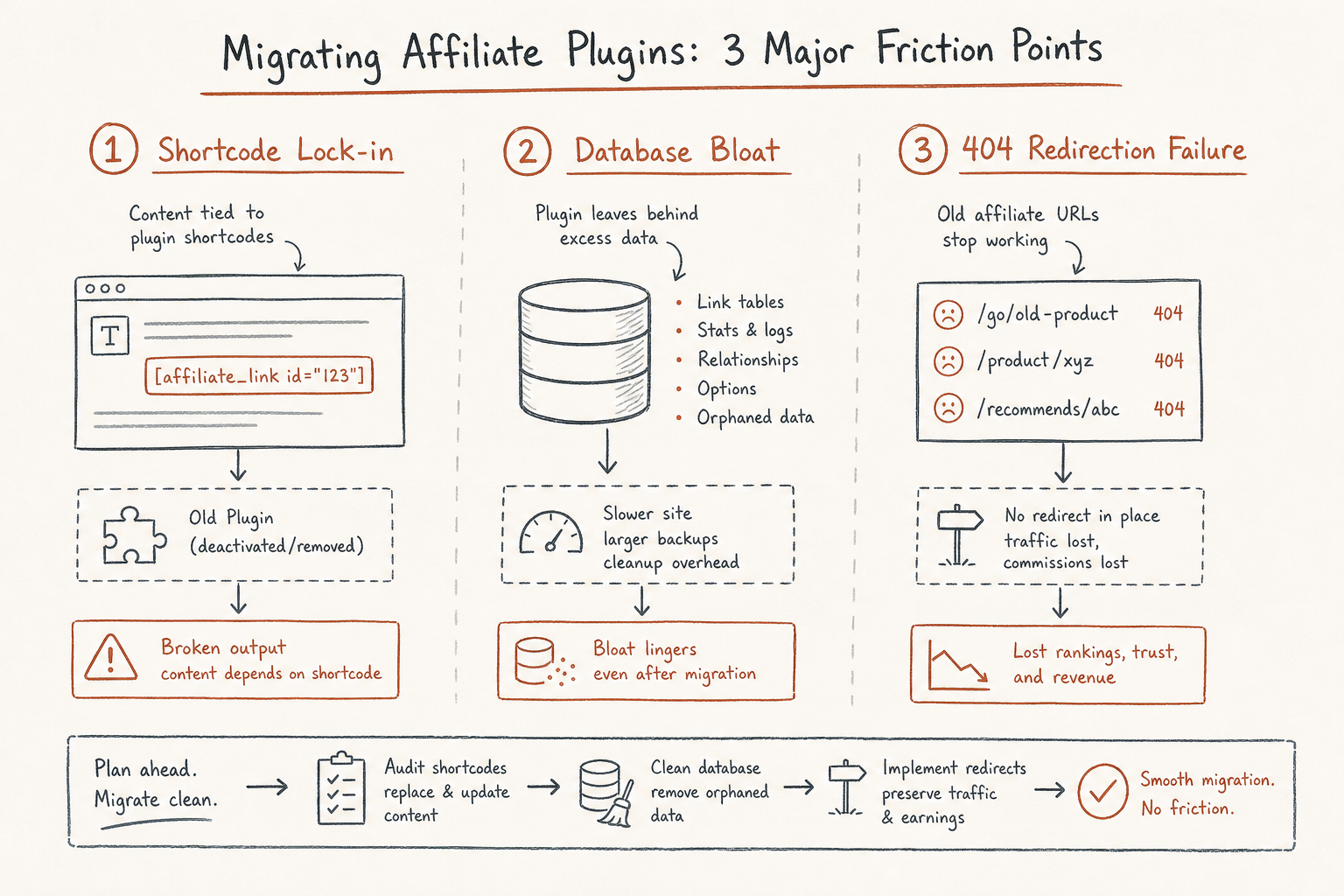
Before evaluating alternatives, it helps to understand why leaving a tool like Lasso is technically daunting. Affiliate link plugins integrate deeply into your WordPress installation in three distinct ways:
- Shortcode Dependency: Every product box you build generates a shortcode (or a specialized block). If you deactivate the plugin, those beautiful conversion boxes turn into raw, broken text strings on your front end.
- Database Architecture: Link managers often store click data, product metadata, and custom images in your
wp_optionsor custom database tables. - Redirection Mechanics: Your cloaked links (e.g.,
yoursite.com/go/product) are handled by the plugin’s redirection engine. If the new tool doesn't map these URLs perfectly, you will instantly send traffic to 404 error pages.
Evaluating competitors of Lasso is not just about finding a tool that makes pretty boxes. It is about finding a tool whose data structure aligns with your publishing volume, whose features match your primary monetization strategy (Amazon vs. SaaS), and whose migration tools are reliable enough to port your existing setup without revenue loss.
The Citable Evaluation Framework
To evaluate competitors objectively, you need a weighted checklist. Rather than looking at marketing pages, run every potential Lasso alternative through these five technical criteria.
1. The Database and Server Load Factor
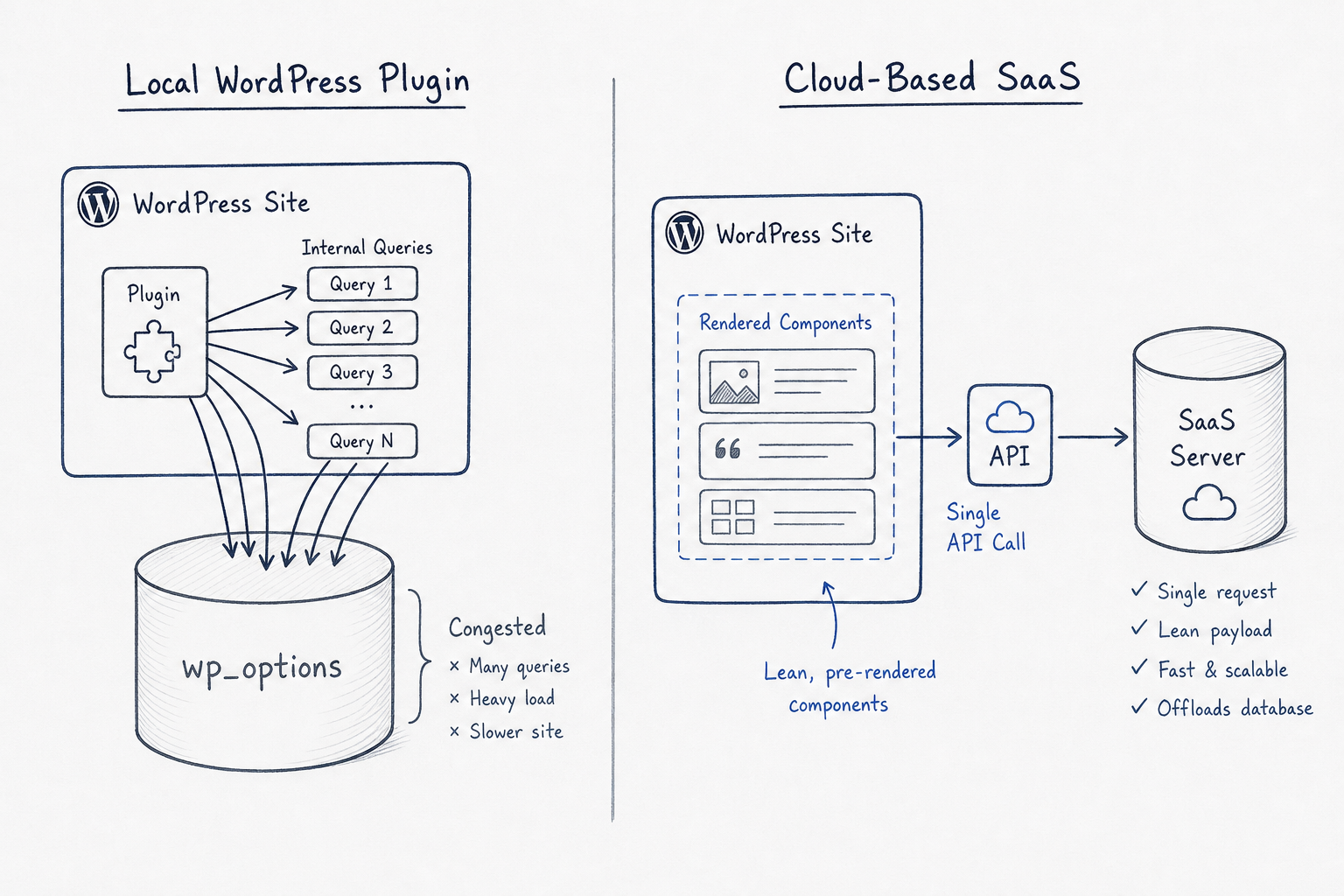
Where does the tool store its data? Native WordPress plugins run all their queries on your server. If you have 5,000 affiliate links and a high-traffic site, querying that database for link health, click tracking, and dynamic price updates can severely degrade your server response time. Look for whether the competitor is a cloud-based platform syncing via API, or a localized WordPress plugin.
2. Amazon API Reliance vs. Scraping Capabilities
Lasso built its reputation on allowing users to pull Amazon product data without needing an active Amazon Product Advertising API (PA API) key. This is critical for new sites that haven't met Amazon's required sales quota. When evaluating a competitor, you must determine if they require the official API to fetch prices and images. If they do, your displays will break the moment Amazon revokes your API access for low sales volume.
3. Display Customization and Core Web Vitals
Pre-built product boxes are great, but how heavy is the CSS and JavaScript payload they load onto your page? A competitor might offer stunning comparison tables, but if they load 300kb of unoptimized CSS on every page, your Core Web Vitals will suffer. Furthermore, evaluate if the tool allows you to strip away its default styling so your theme’s CSS can take over.
4. Broken Link and Out-of-Stock Monitoring
A dead link is a lost commission. Lasso routinely scans for 404s and Amazon out-of-stock items. Any viable competitor must offer an automated, background-scanning mechanism that alerts you before your audience clicks a dead offer.
5. Non-Amazon Program Adaptability
Many older tools were built exclusively for the Amazon Associates ecosystem. If your strategy relies on high-ticket SaaS programs, B2B software, or digital courses, an Amazon-centric tool will be useless. You need a platform that handles raw URLs, custom images, and manual price inputs smoothly.
Direct Layout and Display Competitors
If your primary reason for using Lasso was the conversion-optimized product boxes, grids, and comparison tables, your search should start with tools built explicitly for front-end presentation.
Affiliatable: The Cloud-Based Heavyweight
Affiliatable is arguably the most aggressive direct competitor to Lasso when it comes to visual layout. It offers gorgeous comparison tables, product boxes, pros and cons lists, and rating showcases.
The Structural Difference Unlike Lasso, Affiliatable operates as a cloud-based software-as-a-service platform rather than a localized WordPress plugin. You build your tables and boxes on Affiliatable's web app, and a lightweight companion plugin syncs them to your WordPress site via an API.
This architecture provides a massive performance advantage for large sites. Because the heavy lifting of storing product data, tracking link changes, and formatting tables happens on Affiliatable's servers, your WordPress database remains pristine. You avoid the notorious wp_options bloat that often accompanies heavy affiliate plugins.
Where it Excels:
- It handles custom affiliate programs beautifully. Whether you are promoting a VPN, a web host, or a niche SaaS tool, you can manually input the data and build a stunning box.
- The comparison tables are highly interactive and responsive on mobile devices, which is notoriously difficult to code from scratch.
- Because it is cloud-based, you can manage affiliate links across multiple different websites from a single centralized dashboard.
Where it Falls Short: If you prefer managing everything entirely inside the WordPress backend, switching tabs to a third-party dashboard to generate a new product box can feel disruptive to your writing workflow.
Tasty Links: The Lightweight Alternative
Developed by WP Tasty, Tasty Links took a different approach to link management. Instead of trying to be an all-in-one suite with complex grid builders and API connections, it focuses on being fast, lightweight, and incredibly intuitive.
The Structural Difference Tasty Links shines in auto-linking. You can define a keyword (e.g., "stand mixer") and tell the plugin to automatically hyperlink that phrase across your entire site with your affiliate link. For lifestyle, food, and travel bloggers who mention tools organically within their prose, this feature alone can double affiliate revenue overnight.
Their "Featured Link Blocks" are clean, minimalist product displays with photos and buttons. They don't have the extensive customization of Lasso or Affiliatable, but they integrate seamlessly with standard WordPress blocks without a steep learning curve.
Where it Excels:
- It is remarkably lightweight. It will not slow down your WordPress editor or your front end.
- It supports Amazon images and works beautifully without requiring deep technical knowledge.
- The automatic keyword linking is a massive time-saver for sites with hundreds of existing legacy posts.
Where it Falls Short: If you run a hardcore product review site that requires dense, feature-by-feature comparison tables, Tasty Links is too simplistic. It is designed for organic integration into editorial content, not for high-intensity buyer-intent pages.
The Amazon-Specific Giants
If your site monetizes almost exclusively through the Amazon Associates program, generalist link managers often include features you will never use while lacking the deep synchronization you actually need.
Amalinks Pro: The API-Independent Solution
Amalinks Pro was built specifically to solve the biggest headache in the Amazon Associates ecosystem: pulling product data legally without needing the official API.
The Structural Difference Amazon's terms of service strictly prohibit downloading product images and uploading them to your own server. You must serve them via Amazon's API or their official SiteStripe tool. However, new associates cannot get an API key until they refer three qualifying sales, creating a catch-22.
Amalinks Pro bypasses this by utilizing a proprietary method to pull in authorized product data and images directly from Amazon without requiring the PA API. Once you do qualify for the API, it switches over seamlessly.
Where it Excels:
- You can search Amazon directly from your WordPress editor, select a product, and insert a highly optimized showcase box in seconds.
- Their comparison table builder is native to WordPress and incredibly robust, allowing you to pull data points directly from Amazon listings.
- It ensures total compliance with Amazon's strict operating agreement.
Where it Falls Short: It is strictly an Amazon tool. If you decide to pivot your site to private affiliate programs or SaaS tools, Amalinks Pro cannot help you manage those links.
AAWP (Amazon Affiliate WordPress Plugin): The Legacy Standard
AAWP is the oldest, most established, and arguably the most robust Amazon-specific plugin on the market. It is the tool of choice for thousands of traditional niche site builders.
The Structural Difference AAWP relies heavily on the Amazon PA API. It uses this connection to generate dynamic product boxes, automated bestseller lists, and new release feeds that auto-update their prices and stock status multiple times a day.
Where it Excels:
- The automated bestseller lists are incredible for conversion. You can insert a shortcode like
[amazon bestseller="standing desk" items="3"], and AAWP will automatically generate a dynamic, always-updated list of the top three standing desks on Amazon. - The data caching is highly optimized, ensuring your site speed isn't crippled by constant API calls to Amazon's servers.
- It uses customizable templates, allowing developers to tweak the exact CSS and HTML structure of the product boxes.
Where it Falls Short: If your Amazon API key is revoked due to low sales volume, AAWP effectively stops working. Furthermore, the default out-of-the-box designs look a bit dated compared to modern alternatives, requiring some custom CSS to look premium.
The "Hidden" Costs of Affiliate Link Management
When evaluating these competitors, it is easy to get caught up in feature parity. However, the affiliate industry is full of myths that lead publishers to choose the wrong tools.
Myth: A Prettier Box Automatically Equals Higher Conversions
There is a pervasive belief that if you migrate from a standard text link to a beautifully designed, shadow-dropped product box with a pulsing CTA button, your conversions will skyrocket. This is fundamentally false.
Context and trust dictate conversions, not CSS. If you place a massive product box in the middle of an informational article where the user has zero buyer intent, they will scroll past it—often faster than they would a text link, because the box triggers "banner blindness." A tool like Tasty Links, which focuses on contextual text links, will often outperform a heavy graphical tool in top-of-funnel content.
The Shortlink Mapping Catastrophe
Let’s look at a scenario that plays out weekly in niche site communities. An affiliate marketer, we’ll call him Mark, decides to switch from Lasso to a competitor. He deactivates Lasso, installs the new plugin, and assumes his links are fine.
A week later, his Amazon revenue drops to zero.
What Mark didn't realize is that all his /go/product cloaked URLs were being managed by Lasso's internal redirection engine. When he deactivated the plugin, every single affiliate link on his site returned a 404 error. The competitor he chose didn't have an automated migration tool for Lasso data. Mark had to spend 40 hours manually extracting his URLs from a database backup and importing them into the new tool's redirection manager.
When evaluating a competitor, the first question you must ask their support team is: “Do you have a one-click migration tool specifically for Lasso, and how does it handle legacy shortcodes?”
Beyond the Tool: Finding the Right Links to Manage
A world-class link management tool is useless if you are feeding it low-converting, low-payout affiliate programs. While Lasso offers some program discovery features, the platform's primary strength is management and display, not curation.
If you are looking to pivot away from the low commissions of Amazon Associates, you need to look toward high-ticket software, financial products, and B2B services. This is where dedicated program directories become the necessary companion to whatever link management tool you choose.
Instead of relying on a link management plugin to tell you what to promote, smart marketers use centralized hubs. For example, if you are looking to monetize a B2B audience, you need reliable data on commission structures, cookie durations, and payout terms before you ever build a product box. To understand how to vet these high-level partnerships effectively, you can reference this Trustworthy SAAS Partners Evaluation Checklist.
Furthermore, when comparing different platforms for discovering these programs, it helps to understand the landscape of affiliate directories. Evaluating program sources is just as important as evaluating the plugins that display them. For a deeper dive into directory comparisons, review the Affililist Vs Findaffiliates for Discovering Partner Programs Source Guide.
By decoupling your "program discovery" from your "link management," you free yourself to choose the best tool for each specific job. You can use a comprehensive directory to surface a high-converting SaaS offer, and then use a tool like Affiliatable to build a custom, high-converting display for it on your site. For more insights on sourcing SaaS programs specifically, you might explore the Affiliate Watch Vs Affililist for SAAS Programs Source Guide.
Evaluating Link Health and Redirection Mechanics
When auditing a competitor, you must look under the hood at how they handle the actual mechanics of a click.
Redirection Types When a user clicks your cloaked link, your server must send a status code to their browser. Most basic plugins use a standard 302 (Found/Temporary) or 301 (Moved Permanently) redirect. However, advanced link managers use 307 redirects for affiliate links. A 307 redirect tells the browser "this resource has moved temporarily, but do not cache this redirect." This is critical because if a browser caches an affiliate redirect, you might lose tracking data on subsequent clicks, or fail to send the user to an updated destination if you swap out the affiliate program later. Ensure your chosen competitor supports uncached 307 redirects.
Global vs. Local Out-of-Stock Tracking If you rely on Amazon, an out-of-stock product kills your conversion rate. When evaluating a tool like AAWP or Amalinks Pro, verify how often they ping the API for stock updates. Furthermore, do they offer a fallback mechanism? A premium competitor will allow you to set a secondary link (e.g., to Walmart or a direct manufacturer) that automatically swaps into the product box if the primary Amazon listing goes out of stock.
The No-Follow and Sponsored Attributes
Google’s guidelines require all affiliate links to be marked with rel="sponsored" (or at least rel="nofollow"). If a link manager does not automatically append these tags to every cloaked URL and product box button it generates, you are risking a manual penalty from Google. Check the competitor's global settings to ensure this is handled at the server level, not just the front-end HTML.
Frequently Asked Questions About Lasso Alternatives
Will I lose my existing shortlinks if I switch from Lasso? You will lose functionality immediately upon deactivation. However, your data remains in the WordPress database. Top-tier competitors usually offer built-in migration wizards that scan your database for Lasso shortcodes and URLs, automatically mapping them to their own system. Always run a full site backup before triggering a migration script.
Do any Lasso competitors offer fully cloud-based management? Yes, Affiliatable is the most prominent cloud-based alternative. It manages your link data, table designs, and analytics on its own servers, pushing the final HTML to your WordPress site via a lightweight connector plugin. This drastically reduces database bloat on your host.
Can I use Amazon product images without an API key? Technically, Amazon requires the use of their API or SiteStripe to serve images. Plugins like Amalinks Pro bypass the traditional API requirement by utilizing localized, approved methods for new accounts. However, manually downloading an image from Amazon and uploading it to your WordPress media library is a direct violation of their operating agreement and can result in a ban, regardless of which plugin you use.
How do I manage links across multiple websites? If you run a portfolio of niche sites, localized plugins require you to log into each site individually to update a link. Cloud-based competitors allow you to update a single destination URL in a central dashboard, which instantly updates across all your connected WordPress sites. If portfolio management is your priority, prioritize cloud architecture over native plugins.
Final Assessment Criteria
Choosing a competitor to Lasso is an exercise in prioritization. No single tool does everything perfectly.
- If you are running a high-traffic authority site and want zero database impact while building custom SaaS displays, look toward cloud solutions.
- If you are a food or lifestyle blogger who relies on organic in-text mentions, lean toward lightweight auto-linking tools.
- If your entire revenue model is built on dynamic Amazon pricing and automated bestseller lists, commit to a dedicated API-driven plugin.
Your link management infrastructure is the final bridge between your content and your revenue. By evaluating alternatives through a strict, technical framework—prioritizing data structure, API reliance, and migration safety—you ensure that when you finally make the switch, your revenue scales upward rather than breaking apart.