How to Use Pinterest Affiliate Programs (Step-by-Step)
Learn how to use Pinterest affiliate programs to drive high-intent traffic. Discover step-by-step strategies for pin creation, SEO, and avoiding shadowbans.
Most affiliate marketers treat Pinterest like a social media network. They drop their affiliate links into a few scattered pins, wait two weeks, and abandon the platform when they don't see instant commissions.
This is a fundamental misunderstanding of what Pinterest actually is.
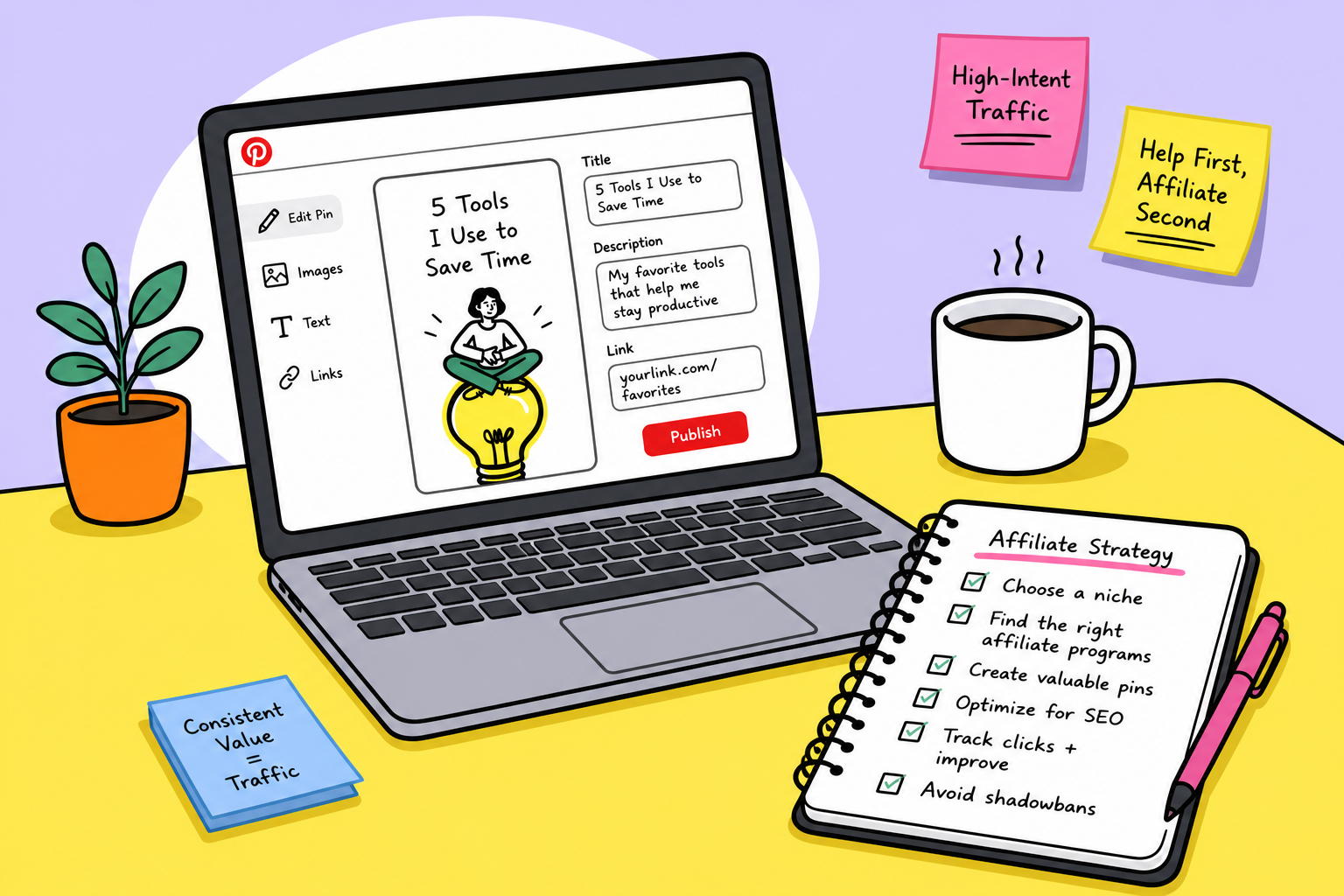
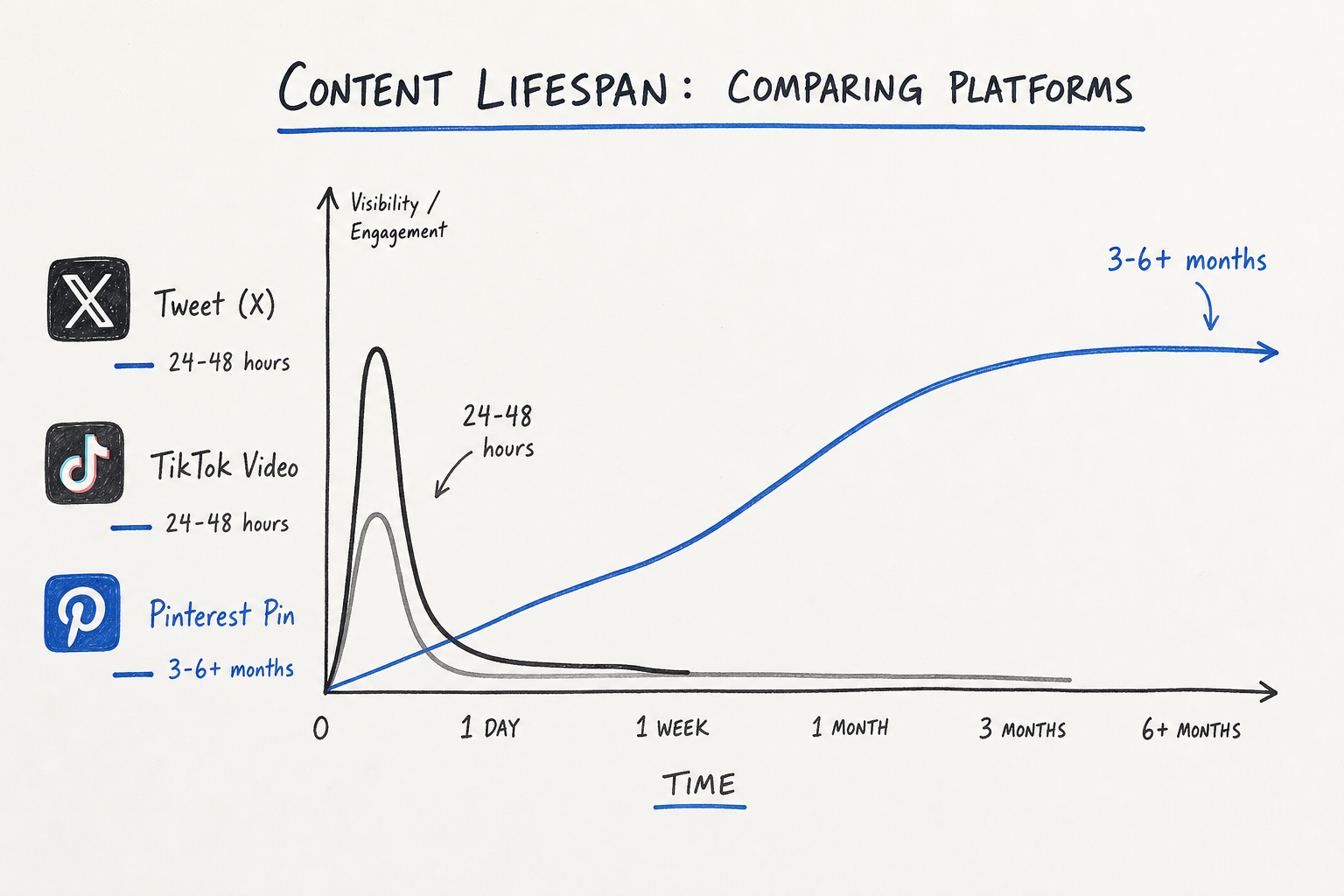
Pinterest is not a social network; it is a visual search engine. Its users are actively hunting for inspiration, solutions, and products to buy. Unlike the fleeting 24-hour lifespan of an Instagram story or a Twitter post, a well-optimized Pinterest pin can drive consistent, high-converting traffic to your affiliate offers for months—even years—after you publish it.
However, the rules of engagement on Pinterest have changed. Spam filters are aggressive, link policies are strictly enforced, and generic stock imagery no longer commands attention. If you want to build a sustainable revenue stream, you need a methodical approach to creating, optimizing, and distributing your affiliate content.
Whether you are promoting B2B SaaS tools or physical consumer products, this guide will break down the exact step-by-step process for integrating affiliate programs into your Pinterest strategy without getting shadowbanned.
Why Pinterest is a Strategic Goldmine for Affiliates
Before digging into the technical setup, it helps to understand the mechanics of Pinterest traffic and why it routinely out-converts other organic channels.
First, consider the user intent. People do not open Pinterest to argue about politics or catch up on news. They log in to plan. They plan weddings, office renovations, financial overhauls, and software stacks. According to Pinterest Business, users are highly receptive to brands and products that help them bring their plans to life.
Second, consider the content lifespan. The half-life of a tweet is about 20 minutes. A TikTok video might spike for a few days. A Pinterest pin, however, functions like a Google search result. Because pins are indexed by both Pinterest's internal search engine and external engines like Google, a pin published in January can continue to rank and generate clicks through December.
 Finally, Pinterest natively supports affiliate marketing. You do not have to resort to clunky "link in bio" workarounds. The platform allows you to place your affiliate link directly in the destination URL of a standard pin, removing friction from the buyer's journey.
Step 1: Laying the Foundation with a Business Account
If you are currently pinning from a personal account, stop. You are flying blind.
To successfully promote affiliate links, you need a Pinterest Business account. Upgrading is free, but the features it unlocks are critical for tracking your performance.
Claim Your Website and Social Accounts
When you claim your website, Pinterest displays your profile picture next to any pins that originate from your domain. This builds instant authority. If you are operating a standalone blog or review site alongside your Pinterest strategy, claiming your domain is non-negotiable.
Enable Rich Pins
Rich Pins automatically pull extra information from your website directly into your pins. If you are linking to your own review articles rather than direct-linking to an affiliate offer, Rich Pins ensure that your article title, meta description, and updated pricing (if applicable) sync seamlessly.
Understand the Analytics Dashboard
A Business account gives you access to Pinterest Analytics. Instead of guessing which designs work, you can filter your data to see exactly which pins generate the most "Outbound Clicks"—the only metric that actually matters for an affiliate marketer. High impressions with low outbound clicks indicate a strong visual but a weak call-to-action.
Step 2: Choosing the Right Affiliate Programs for Pinterest
Not all affiliate programs perform well on a visual platform. A highly technical, backend server monitoring tool might struggle to gain traction, whereas a project management SaaS, a graphic design asset, or a personal finance budgeting template can explode.
When sourcing programs, you want products that solve visual problems or have highly aesthetic outcomes.
If you are struggling to find trustworthy offers, using a dedicated directory is the fastest way to cut through the noise. This is exactly why we built AffiliList. As a comprehensive and streamlined directory of the best affiliate programs available on the market, AffiliList focuses heavily on SaaS and digital tools. With a curated database of over 10,000 affiliate programs, you can filter by commission rate, cookie duration, and specific niches to bypass outdated lists and find high-converting offers tailored to your audience.
If you are still brainstorming, check out our guide on the 11 Best Niches for Affiliate Marketing (SaaS & Digital).
Direct Linking vs. The Bridge Page
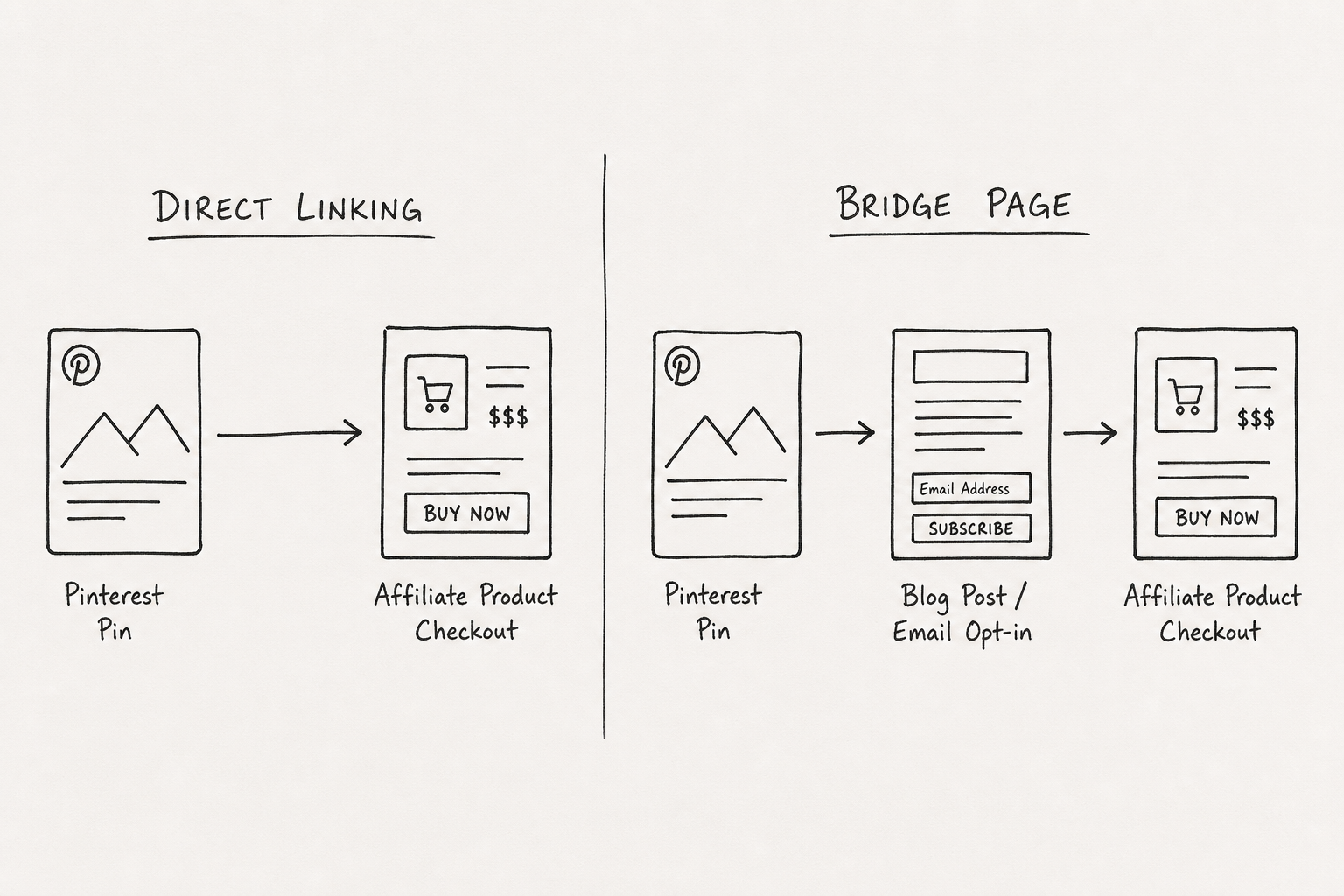
When you find a program, you face a strategic choice: do you link the pin directly to the merchant, or do you route traffic through your own content first?
1. Direct Linking Pinterest explicitly permits direct affiliate linking. You can paste your affiliate link straight into the destination URL field of the pin.
- Pros: Low friction, fast to execute, requires no website.
- Cons: You don't capture the user's email. Some affiliate networks (like Amazon Associates) have strict terms of service regarding where links can be placed, and some networks' raw tracking links trigger Pinterest's spam filters.
2. The Bridge Page (or Landing Page) Instead of linking to the merchant, you link to a piece of your own content—a blog post, an email opt-in page, or a comparison table—which then contains your affiliate links.
- Pros: You own the audience. You can capture emails, retarget visitors, and pre-sell the product. It also insulates you from platform policy changes.
- Cons: Requires building and hosting a website. Adds a step to the conversion process.
For most marketers, a hybrid approach works best. Direct link for low-ticket impulse buys, and use bridge pages for high-ticket software or complex B2B solutions. For a deeper dive into building an owned asset, read How to Start a Profitable Affiliate Marketing Blog.
Step 3: Crafting Click-Worthy Affiliate Pins
Pinterest is visually competitive. Dropping a raw product screenshot onto a white background is not going to cut it. To stop the scroll, your pins need to follow specific anatomical rules.
The Golden Ratio
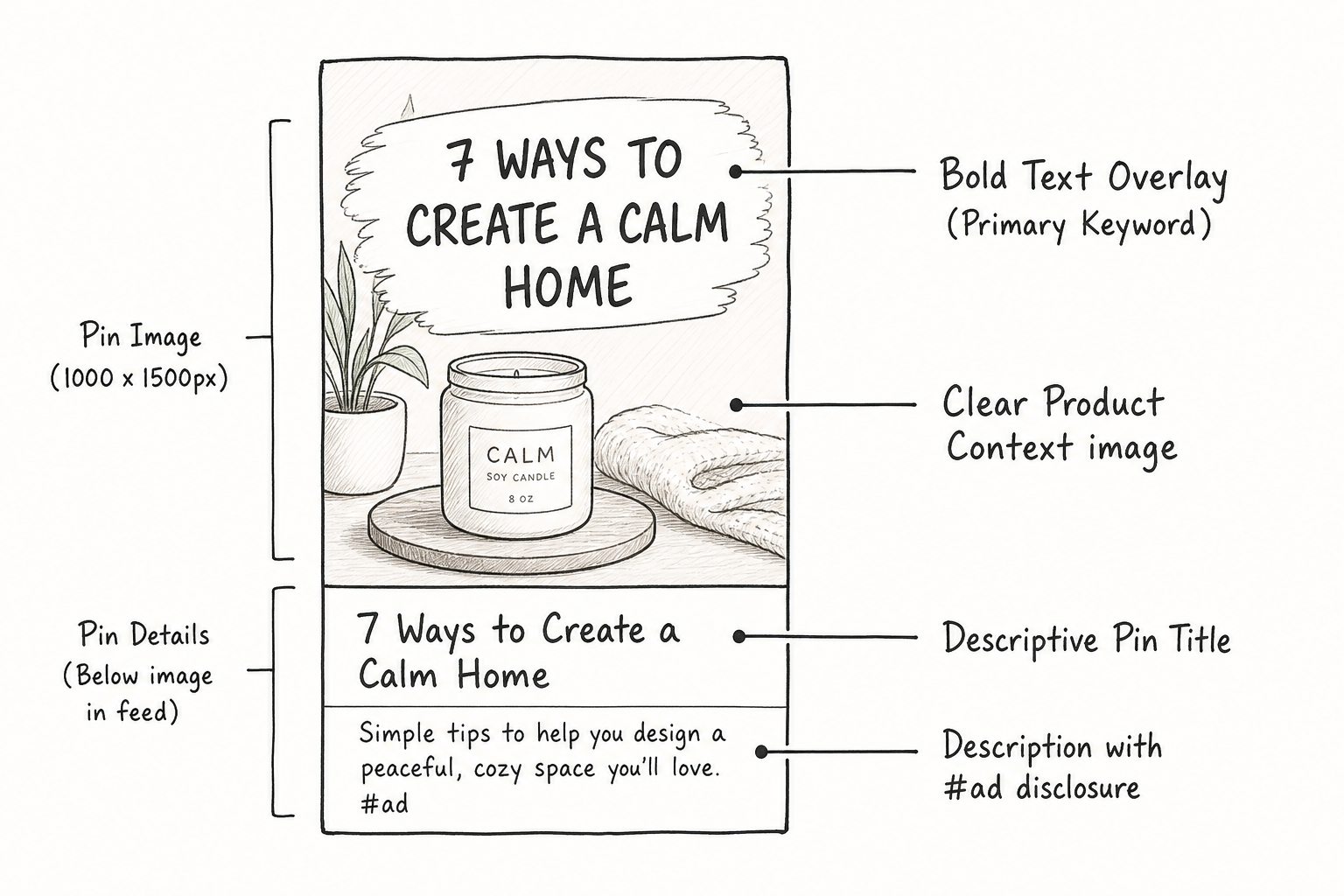
Pinterest heavily penalizes horizontal and square images in its feed. Your pins must be vertical. The optimal aspect ratio is 2:3, typically 1000 pixels wide by 1500 pixels tall. Anything longer may be truncated in the feed; anything shorter loses valuable real estate.
Text Overlays Are Mandatory
Users scroll fast. They do not stop to read the tiny description beneath the image. The most critical information must be integrated directly into the image as a text overlay.
If you are promoting an email marketing software, the overlay shouldn't just say the brand name. It should say: "The Exact Email Automation Setup That Doubled My Open Rates." Focus on the transformation or the solution, not just the product feature.
Visual Contrast and Branding
- Readability: Use large, bold, sans-serif fonts for the main hook. Script fonts look pretty but are unreadable on mobile screens (where 80% of Pinterest traffic originates).
- Faces and Context: Whenever possible, show the product in action. If it's software, show a clean, mock-up dashboard on a laptop rather than a floating logo.
- Templates: Create 4-5 core design templates in Figma or Canva. This allows you to rapidly test different headlines for the same affiliate product without starting from scratch.
Step 4: Disclosures and Compliance (Avoiding the Ban Hammer)
The fastest way to lose your Pinterest account is to ignore Federal Trade Commission (FTC) guidelines or platform rules.
According to the official Getting Started With Affiliate Links on Pinterest documentation, transparency is not optional. You must disclose your affiliate relationship clearly and conspicuously.
- Use Clear Hashtags: Include
#ad,#sponsored, or#affiliatein your pin description. Do not bury it at the end of a 500-word paragraph; place it where a user can easily see it. - Avoid Link Cloaking: Do not use URL shorteners like Bitly to mask your affiliate links. Pinterest's algorithm frequently flags shortened links as spam, leading to shadowbans. Use the raw affiliate link provided by the network, or use a branded redirect from your own domain (e.g.,
yourdomain.com/recommends/product).
Step 5: Mastering Pinterest SEO
Because Pinterest is a search engine, your pins need to be optimized for specific queries. If you skip keyword research, your pins will languish unseen.
Finding Your Keywords
Forget external SEO tools for a moment. The best keyword research tool for Pinterest is the Pinterest search bar itself.
Type in a broad seed keyword related to your affiliate product (e.g., "project management"). Look at the autocomplete suggestions and the colorful tiles that appear below the search bar. These are the exact long-tail phrases users are searching for right now (e.g., "project management templates," "project management workflow").
The Pinterest SEO Matrix
To rank, you need to embed your target keywords in four specific places:
- Pin Title: Make it punchy and keyword-rich. (e.g., "5 Best Project Management Tools for Freelancers")
- Pin Description: Write 2-3 natural sentences explaining what the user will find when they click. Include secondary keywords. Do not keyword stuff.
- Text Overlay: Pinterest's visual AI actually reads the text on your image. Ensure your target keyword is present in the image text.
- Board Names and Descriptions: Save your pins to highly relevant, narrowly focused boards. Instead of a board named "Marketing Stuff," create a board named "B2B SaaS Affiliate Marketing Strategies."
Step 6: Automating and Scaling Your Strategy
Consistency is the only way to win on Pinterest. Pinning 30 times in one day and then disappearing for a month tells the algorithm you are an unreliable creator.
You need to maintain a steady drip of fresh content. A "fresh pin" is defined as a new image/video graphic—even if it links to a URL you have promoted before.
Scheduling Tools
Manually pinning 3-5 times a day is tedious. Leverage automation.
Pinterest has a native scheduler that allows you to schedule pins up to 30 days in advance. It is free, reliable, and keeps you within the platform's ecosystem.
If you are managing a massive volume of assets, approved third-party tools like Tailwind offer bulk scheduling and "Ghostwriter" AI features to help generate descriptions. However, avoid cross-posting the exact same pin to 10 different boards simultaneously. Space out related pins by at least 7-14 days to avoid tripping the spam filters.
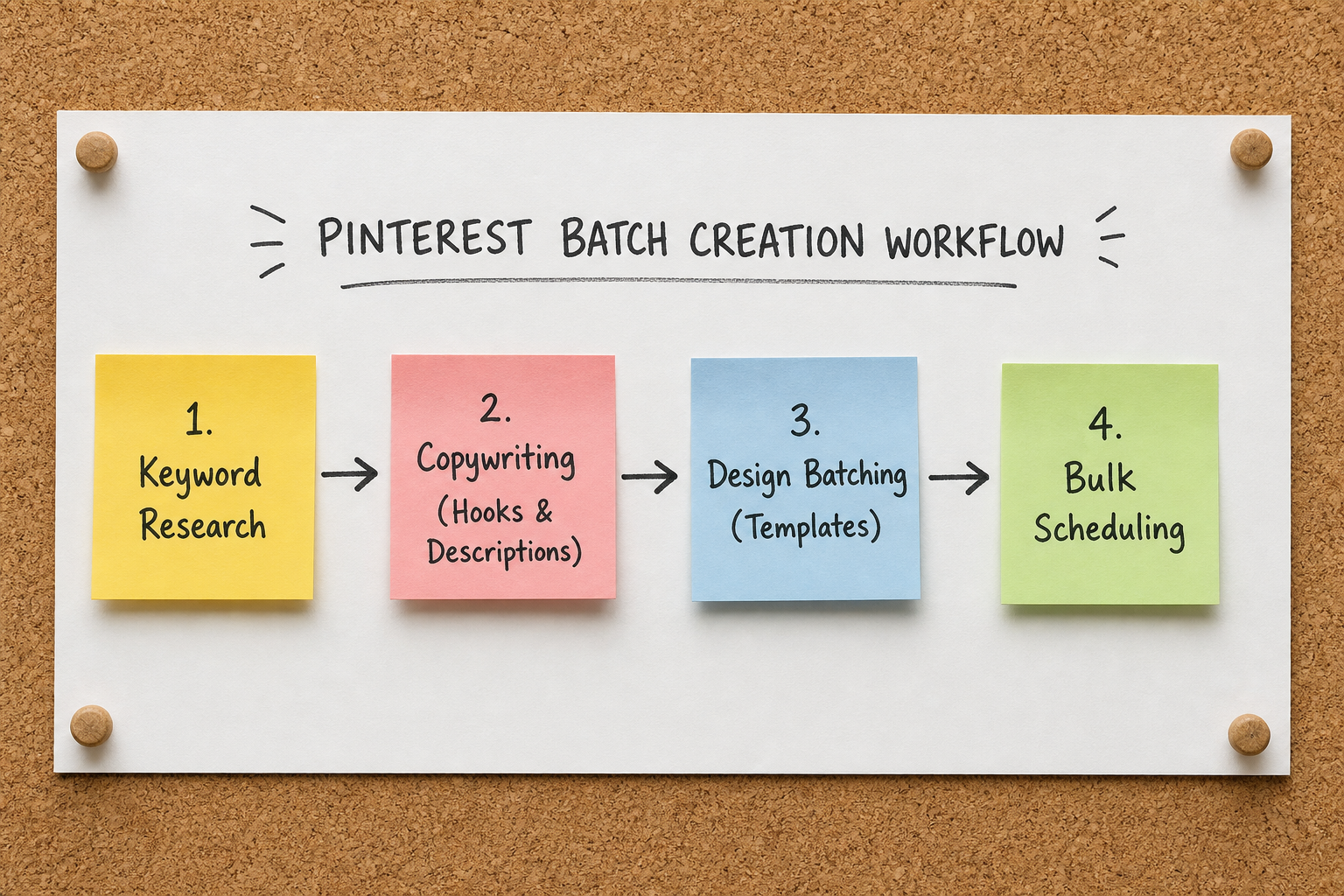
The Batch Creation Workflow
To avoid burnout, adopt a batching system:
- Monday: Research keywords for 5 distinct affiliate offers.
- Tuesday: Write out 10 different text overlay variations (hooks) for each offer.
- Wednesday: Duplicate your Canva/Figma templates and drop in the new text and screenshots (resulting in 50 unique pins).
- Thursday: Write descriptions and schedule all 50 pins to drip out over the next 15 days.
For more advanced scaling tactics, review our breakdown on building an Affiliate Marketing Side Hustle: 5 Steps to $1k/Mo (2026).
Case Scenario: Promoting a Digital Course
Let's apply these steps to a concrete scenario. Suppose you want to promote a high-ticket SEO course that pays a $200 commission.
- The Mistake: You grab the course logo, link it directly to the checkout page, and title the pin "Buy this SEO Course." Result: Zero clicks.
- The Fix: You write a quick blog post on your site titled "How I Tripled My Organic Traffic in 90 Days." Within that post, you deeply review the course and include your affiliate link.
- The Pin Creation: You design 5 different vertical pins.
- Pin 1 focuses on the pain point: "Tired of writing articles that get zero traffic?"
- Pin 2 focuses on the outcome: "My Exact 90-Day SEO Strategy (Step-by-Step)."
- Pin 3 is an infographic showing a generic SEO checklist.
- The Execution: You schedule these pins to publish a few days apart, saving them to your "Blog Traffic Tips" and "SEO Strategies" boards.
By routing the user through a high-value bridge page, you warm up the cold Pinterest traffic, build trust, and significantly increase the likelihood of capturing that high paying affiliate program commission.
Affiliate Link Tips and Common Mistakes to Avoid
Even experienced marketers make critical errors when moving to Pinterest. As highlighted in discussions on r/Affiliatemarketing, a few specific pitfalls trap most beginners.
Mistake 1: Stealing Content Do not scrape images from Instagram, TikTok, or other Pinterest creators and slap your affiliate link on them. Pinterest's visual recognition software will detect the duplication. Your account will lose reach and eventually face suspension.
Mistake 2: Ignoring Seasonal Trends Pinterest is heavily trend-driven. People search for Q4 software budgets in September. They search for fitness apps in December. You need to publish your pins 45 to 60 days before a seasonal trend peaks to give the algorithm time to index your content.
Mistake 3: Giving Up After 30 Days Pinterest is a slow burn. A pin you publish today might get ten impressions this week, only to be picked up by the algorithm three months later and drive hundreds of daily clicks. If you are looking for instant, overnight commissions, Pinterest is the wrong channel.
Frequently Asked Questions (FAQ)
Can I do Pinterest affiliate marketing without a blog?
Yes. Pinterest allows direct affiliate linking. You can create a pin and place your affiliate tracking link directly into the destination URL. However, relying purely on direct links means you forfeit the ability to capture email addresses and build a long-term, owned audience. Additionally, you must ensure the specific affiliate network permits direct linking from social platforms.
Are ClickBank links allowed on Pinterest?
Technically, yes, but practically, it's risky. Historically, massive amounts of spam have originated from raw ClickBank links, causing Pinterest's automated filters to aggressively flag them. If you are promoting offers from networks with high spam reputations, you are strongly advised to use a bridge page or a custom domain redirect rather than pasting the raw tracking link into Pinterest.
How long does it take to see results from Pinterest affiliate links?
Unlike a paid ad campaign that generates immediate traffic, organic Pinterest growth requires patience. Most accounts need 3 to 6 months of consistent, daily pinning before the algorithm fully trusts the account and begins widely distributing the content. Treat it like an SEO channel, not a social media feed.
How do I know if an affiliate offer is legitimate?
With thousands of programs available, finding credible partners is crucial. Stick to vetted directories like AffiliList, and read our guide: Is Affiliate Marketing Legit? (How to Spot Real Offers) to understand how to identify predatory commission structures and unreliable merchants.
By treating Pinterest as a search engine, respecting the platform's visual requirements, and methodically tracking your outbound click data, you can build a highly resilient affiliate marketing asset that works in the background long after you close your laptop.