
Best YouTube Affiliate Programs for Video Creators (2026)
Discover the most profitable YouTube affiliate programs for 2026. Learn how to combine native YouTube Shopping with high-paying external networks for maximum revenue.
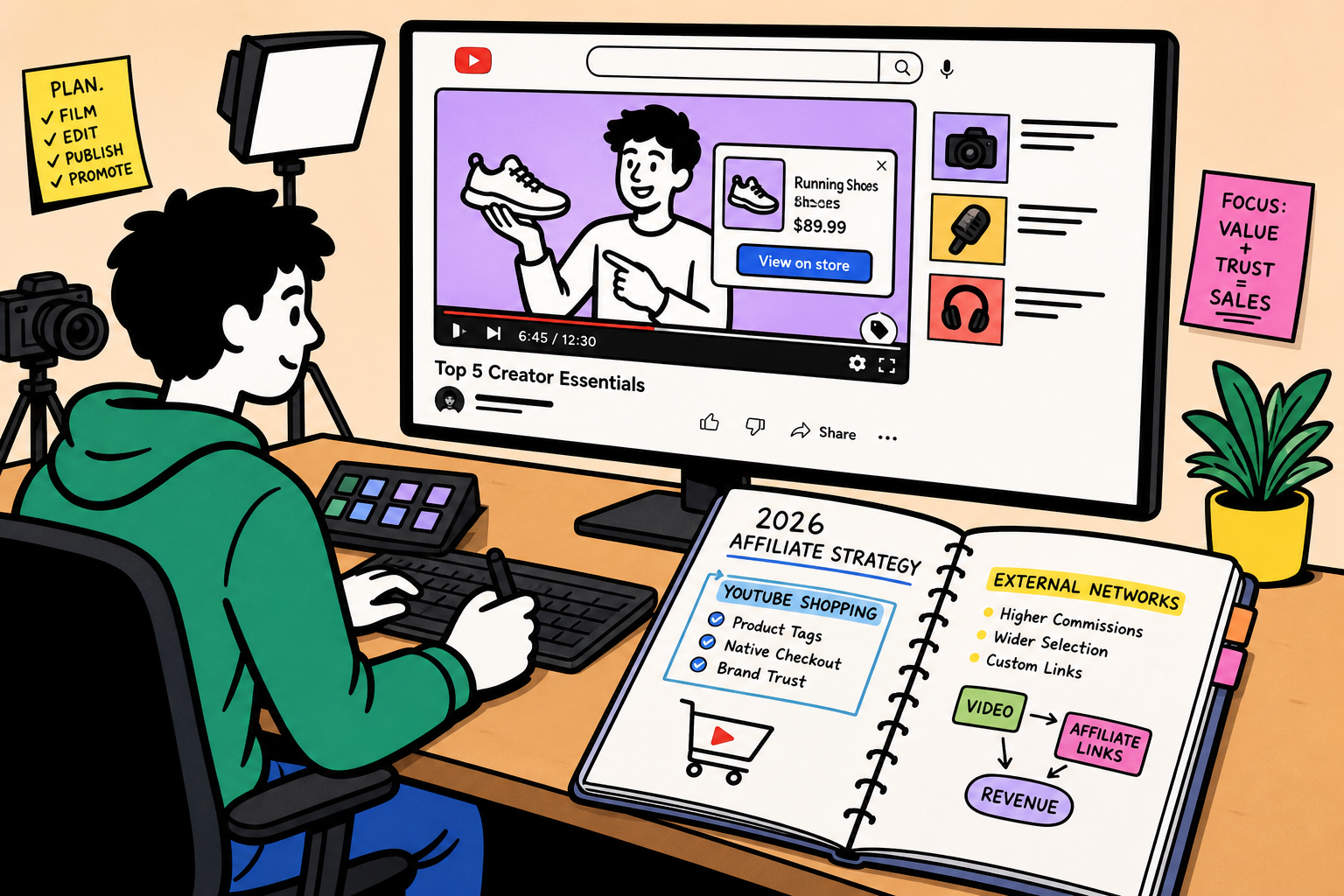
Relying entirely on YouTube AdSense is a vulnerable business model. A sudden algorithm shift, a change in advertiser sentiment, or an unexpected demonetization flag can slice your monthly channel revenue in half overnight.
Smart video creators treat AdSense as a bonus, not the foundation. The foundation of a highly profitable, resilient channel is affiliate marketing. By matching your audience's specific problems with the exact software, tools, or physical products that solve them, you take control of your revenue. You decide what to promote, how to pitch it, and where to place the links.
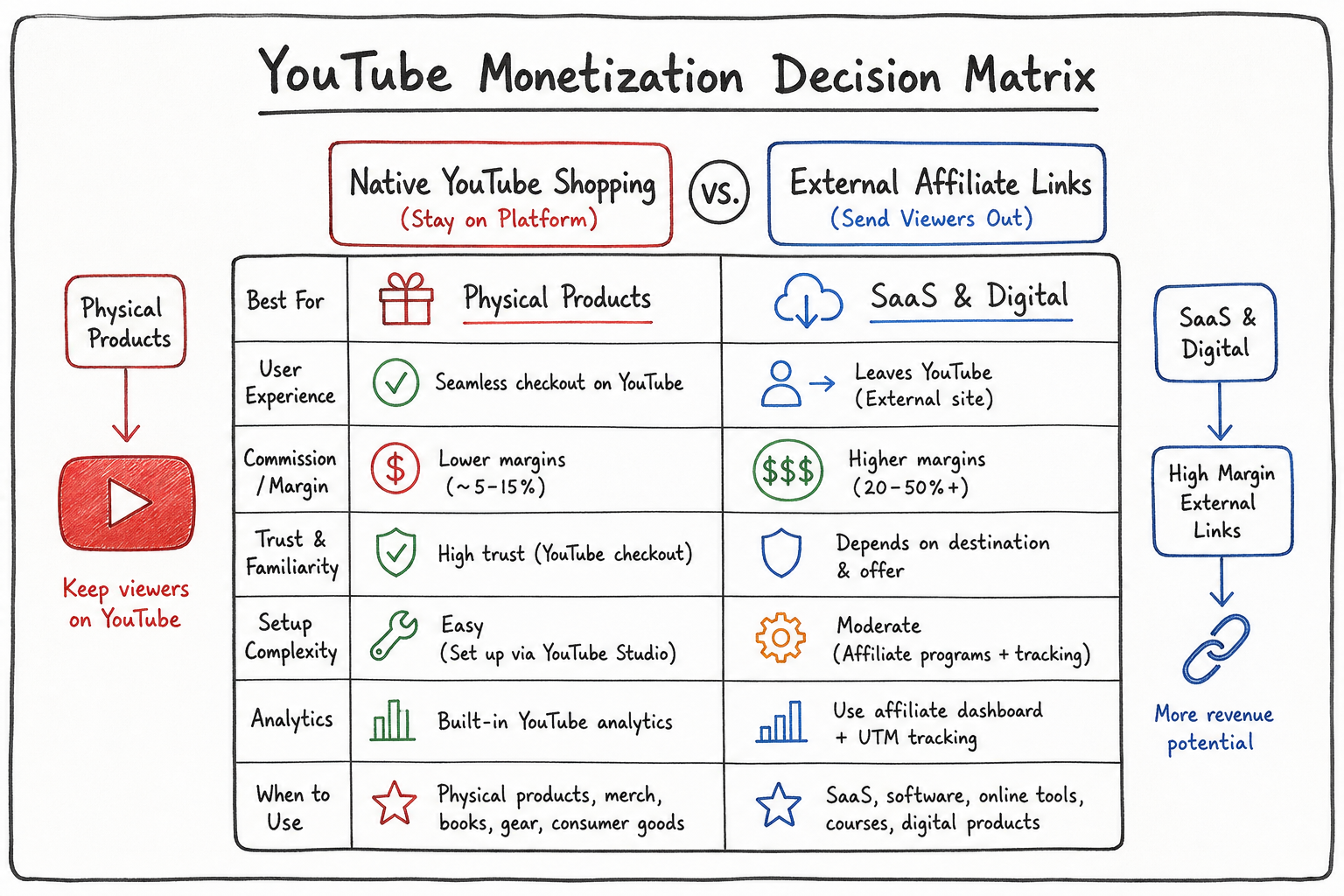
But navigating the ecosystem of YouTube monetization has become complex. You now have two distinct paths: the native YouTube Shopping affiliate program, which integrates directly into the platform, and traditional external affiliate networks where you manage links in your descriptions and comments.
This guide breaks down the most profitable affiliate programs for YouTube creators in 2026, how to choose the right monetization path for your audience size, and the exact placement strategies that turn passive viewers into active buyers.
The Shift in YouTube Monetization
For years, the standard playbook for YouTube monetization was simple: get 1,000 subscribers and 4,000 watch hours, join the YouTube Partner Program, and let pre-roll ads do the heavy lifting.
While ad revenue remains a staple, the RPMs (Revenue Per Mille) vary wildly by niche. A gaming channel might earn $2 per 1,000 views, while a personal finance channel earns $18. Affiliate marketing flattens this disparity. Even with a small audience in a low-RPM niche, you can generate significant income if you recommend high-converting products.
We see this constantly at AffiliList. Creators building an affiliate marketing side hustle are leveraging hyper-specific YouTube tutorials to drive traffic to high-ticket SaaS tools, often making more from a 500-view video than a 50,000-view vlog.
Path 1: The Native YouTube Shopping Affiliate Program
Google has spent the last few years aggressively pushing e-commerce integration natively into the video player. The YouTube Shopping Affiliate Program allows eligible creators to tag products directly in their videos, Shorts, and livestreams.
Instead of telling viewers, "Link in the description," a clickable product overlay appears on the screen, allowing users to browse and buy without entirely leaving the YouTube ecosystem.
Eligibility Requirements
To access the native Shopping affiliate features, you must cross a specific threshold. According to official guidelines, your channel needs to meet these baseline criteria:
- Your channel must be part of the YouTube Partner Program (YPP).
- You must have at least 10,000 subscribers (though YouTube frequently tests lowering this for specific regions or merchant partners).
- You must reside in an eligible country (primarily the US and expanding regions).
- Your channel cannot be set as "Made for Kids."
- Your channel must not have active Community Guidelines strikes.
How Native Tagging Works
Once approved, you gain access to an "Affiliate Hub" within YouTube Studio. Here, you can browse a list of participating merchants and view the specific commission rates they offer for native tagging.
When uploading a video, you use the "Tag Products" feature to search for items you mentioned. These products then appear as interactive shopping buttons below your video player or as pinned elements during a livestream.
The Reality of Native Shopping
While the native integration sounds perfect, early creator feedback has been mixed. In communities like r/PartneredYoutube, creators note that while the native tagging reduces friction for physical products (like tech gadgets or makeup), the merchant list is often limited.
Furthermore, native tagging is currently heavily skewed toward physical retail. If your channel focuses on digital tools, SaaS platforms, or specialized online courses, you will likely find the native Affiliate Hub lacking. For those niches, you must rely on external affiliate programs.
Path 2: External Affiliate Programs (The High-Margin Route)
The traditional method—placing custom affiliate links in your video descriptions and pinned comments—remains the most flexible and lucrative strategy for the vast majority of creators.
You do not need to wait for 10,000 subscribers. You do not even need to be in the YouTube Partner Program. You simply need an audience and a link.
Why External Programs Dominate Digital Niches
External affiliate networks allow you to promote software, web hosting, financial tools, and digital courses. These digital products offer significantly higher margins than physical retail. While a tagged physical product via native shopping might yield a 2% to 5% commission, high paying affiliate programs in the SaaS space frequently offer 30% to 50% recurring commissions.
When you use external links, you also maintain control over your tracking. You can route links through a custom domain (e.g., yourchannel.com/tool), allowing you to swap out the destination URL later if a program shuts down, rather than having dead native tags on older videos.
Best YouTube Affiliate Programs You Can Join Before 1,000 Subscribers
One of the most common myths is that you need a massive channel to start monetizing. As highlighted by directories tracking 100+ YouTube Affiliate Programs You Can Join Before 1K Subs, you can begin placing links on day one.
If you are starting a brand new channel, focus on programs that feature automatic approval or very low barrier-to-entry requirements.
1. Amazon Associates
Despite heavy commission cuts over the years, Amazon Associates remains the entry point for most video creators.
- Why it works: The conversion rate is exceptionally high. Viewers already trust Amazon and likely have payment details saved.
- The Catch: You only get a 24-hour cookie window. If they don't add the item to their cart within 24 hours of clicking, you lose the commission.
- Best for: Camera gear reviews, studio setup tours, book recommendations, and tech channels.
2. General Affiliate Networks
Instead of applying to individual companies, join major networks that house thousands of merchants under one roof. Once approved for the network, applying to individual brands is usually just a one-click process.
- Impact Radius: Known for housing modern SaaS companies, digital services, and direct-to-consumer physical brands.
- ShareASale: Excellent for niche physical products, crafts, WordPress themes, and mid-tier software.
- CJ Affiliate: Heavily populated with travel companies, major financial institutions, and enterprise software.
3. Creator Tool Programs
Ironically, some of the easiest programs to get approved for are the tools you use to run your YouTube channel. Companies serving the creator economy understand the value of micro-influencers.
- TubeBuddy: A popular channel management tool that offers a beginner-friendly affiliate program. They offer recurring commissions, meaning you get paid every month your referral remains subscribed.
- VidIQ: Similar to TubeBuddy, VidIQ offers a robust affiliate tier system, rewarding creators who drive higher volumes with increased percentages.
- Epidemic Sound: The go-to source for royalty-free music for YouTubers. If you mention where you get your background tracks, you can easily drive conversions here.
Top Affiliate Programs by Niche (SaaS & Digital Focus)
Once you graduate from basic retail links, the real money is in SaaS (Software as a Service) and digital infrastructure. If you are struggling with how to pick a niche for affiliate marketing, analyzing the highest-paying software programs is a great way to reverse-engineer a channel topic.
Here are some of the most lucrative categories for YouTube creators.
Web Hosting and Website Builders
Every business, creator, and freelancer needs a website. Tutorials on "How to build a website in 2026" or "Shopify vs. WooCommerce" are incredibly lucrative because the viewer intent is purely transactional.
- Shopify: While they frequently update their bounty structure, referring an active e-commerce merchant can yield significant one-time payouts.
- Hostinger / Bluehost / SiteGround: Hosting companies are famous for high CPA (Cost Per Action) payouts. It is not uncommon to earn $50 to $120 per signup, even if the user only buys a $3/month hosting package for a year.
- Webflow / Framer: As the web design industry shifts toward no-code visual developers, tutorials on these platforms have massive affiliate potential. They often offer a percentage of the referred user's subscription for the first year.
Marketing and Email Automation
Channels that teach marketing, productivity, or business operations can monetize heavily through software recommendations.
- ConvertKit (Kit): Extremely popular among creators. They offer a 30% recurring commission for up to 24 months. If you refer a large creator who pays $300/month for their list size, you earn $90/month from that single click.
- Systeme.io: An all-in-one marketing platform that has aggressively targeted the affiliate space by offering lifetime recurring commissions.
- Notion: While technically a workspace tool, Notion's affiliate program is highly lucrative for productivity channels, offering 50% of all referred payments for the first 12 months.
E-commerce & Creator Monetization Platforms
If your audience consists of other creators looking to sell digital products, referring them to storefront software is a seamless fit.
- Sellfy: A platform designed for creators to sell merch and digital downloads. Sellfy actively promotes its own affiliate program for monetization, offering baseline recurring commissions that scale up as you bring in more sellers.
- Teachable / Skool / Kajabi: Course hosting platforms charge premium monthly fees ($99 to $299+). Capturing a 30% recurring commission on these enterprise-level tools can build a full-time income with surprisingly few conversions.
For a deeper dive into profitable software categories, you can browse the best niches for affiliate marketing on our AffiliList directory, where we categorize programs by their exact commission structures and cookie durations.
Strategic Link Placement: Maximizing Your Click-Through Rate
Having the right affiliate program is only 20% of the equation. The other 80% is how you drive traffic to that link. Slapping a raw URL at the very bottom of a 500-word video description is a guaranteed way to get zero clicks.
You must design your video and your text real estate to funnel viewers seamlessly toward your recommendations.
The "Above the Fold" Description Rule
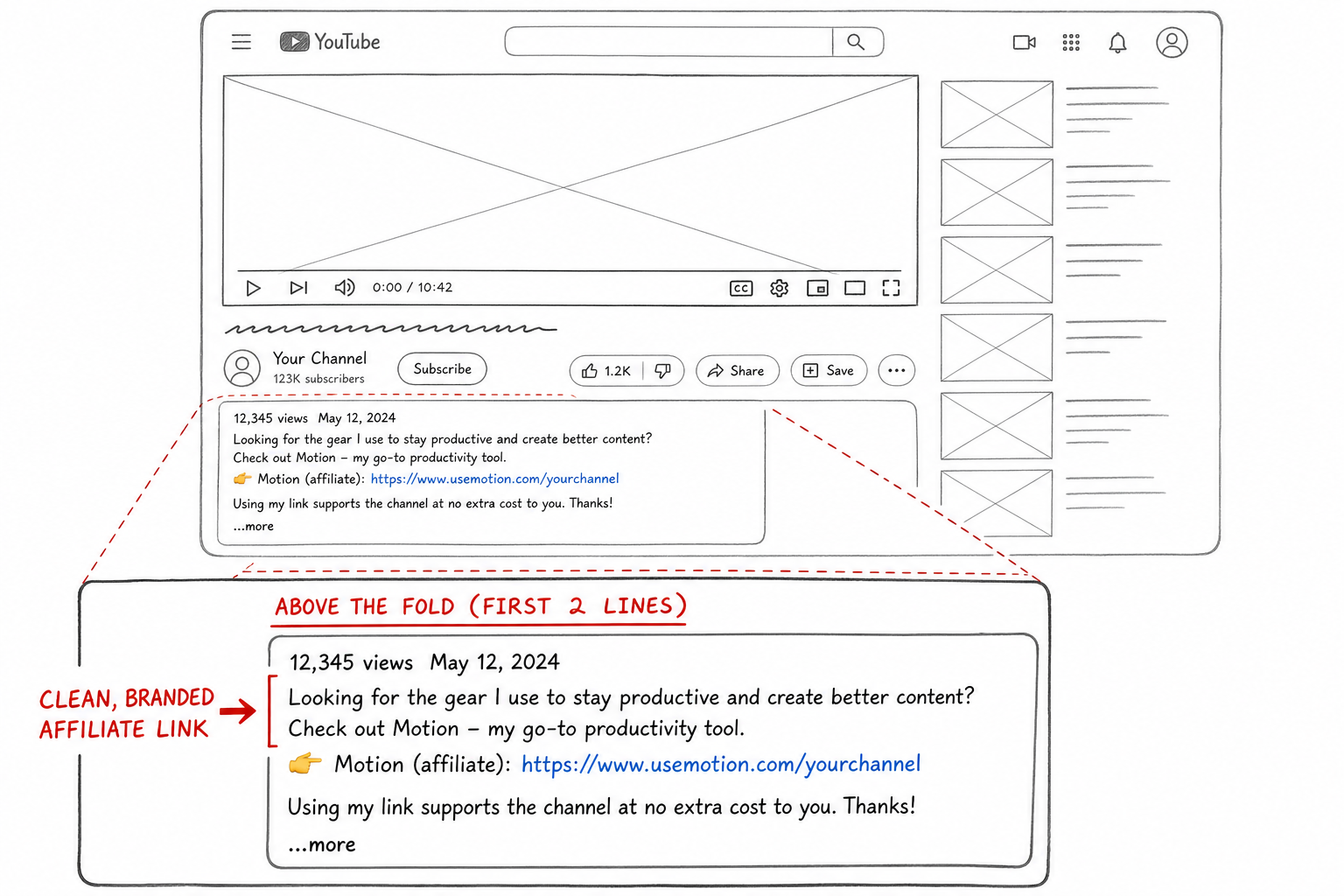
When a viewer watches a YouTube video, only the first two to three lines of the description are visible before they have to click "...more". This visible space is known as "above the fold."
If the primary goal of your video is to drive an affiliate sale (e.g., a review of a specific camera), that affiliate link must be in the first two lines of the description. Do not waste this prime real estate on "Welcome to my channel" or social media links.
The Pinned Comment Strategy
Many viewers never open the description box, especially on mobile. Instead, they scroll directly down to the comments to see what other people are saying while the video plays at the top of their screen.
To capture this mobile traffic, always leave a comment on your own video containing your primary affiliate link and a strong call-to-action (CTA). Then, pin that comment to the top of the feed.
Example of a bad pinned comment: "Here is the link to the software: [link]"
Example of a good pinned comment: "Want to try the exact email templates I showed at 4:12? You can grab your free 14-day trial of ConvertKit here: [link] Let me know if you have any setup questions!"
Verbal Callouts and On-Screen Graphics
The most powerful driver of affiliate clicks is a direct, verbal command from you, the creator.
Do not assume the viewer knows the link is in the description. You have to tell them. But when you tell them matters just as much as how.
The Mistake: Waiting until the end of the video. If you check your Audience Retention graphs in YouTube Studio, you will see that 50% to 70% of your audience has likely clicked away by the final minute. If your CTA is at the end, nobody is hearing it.
The Solution: The "Value-First Mid-Roll CTA." Deliver the core value of the video first. Around the 30% to 40% mark of the video, right after you have demonstrated how a tool solves a major problem, insert your verbal callout.
Script Example: "By the way, if you want to follow along with this tutorial, I've put a link in the description to get a 30-day free trial of this software instead of the usual 14 days. Click that, get your account set up, and let's move on to step three."
Pair this verbal callout with a subtle on-screen graphic (a lower-third pop-up) pointing down toward the description or showing a visual representation of the link.
The $1k/Month Blueprint: High-Ticket vs. High-Volume
When planning an affiliate marketing blog or YouTube channel, you have to do the math on how you will actually reach your revenue goals. If your goal is $1,000 a month from YouTube affiliate marketing, you have two primary mathematical paths.
Strategy A: The High-Volume, Low-Ticket Model
This model relies on Amazon Associates or low-cost physical items.
- Average Commission: $1.50 per item.
- Target: You need roughly 667 conversions per month to hit $1,000.
- Traffic Required: If your click-through rate (CTR) is 1% and your conversion rate is 5%, you need 1.33 million views per month to sustain this.
- Content Style: Broad appeal vlogs, unboxings, top 10 tech gadgets, lifestyle content.
Strategy B: The Low-Volume, High-Ticket Model
This model relies on B2B SaaS, premium courses, or financial software.
- Average Commission: $50 CPA or recurring.
- Target: You only need 20 conversions per month to hit $1,000.
- Traffic Required: Assuming the same 1% CTR and 5% conversion rate, you only need 40,000 targeted views per month.
- Content Style: Highly specific tutorials, deep-dive software comparisons (e.g., "Ahrefs vs. Semrush 2026"), workflow breakdowns.
For most creators starting out, Strategy B is vastly more attainable. It is much easier to rank for a low-competition, highly specific search term like "Best CRM for freelance photographers" than it is to get a million views on a generic tech vlog. This is why targeting profitable affiliate marketing niches based on software yields faster financial results.
Navigating Disclosures: Keeping the FTC and YouTube Happy
Trust is your most valuable asset as a creator. If your audience feels deceived, they will stop clicking your links. More importantly, failure to disclose affiliate relationships violates both YouTube's Terms of Service and Federal Trade Commission (FTC) guidelines.
1. The FTC Requires Clear and Conspicuous Disclosure
The FTC mandates that if you have a financial relationship with a brand you are recommending, you must disclose it clearly.
Hiding "#ad" at the very bottom of a 1,000-word description is no longer considered compliant by the FTC. The disclosure must be close to the link itself.
A simple, clear statement above your links works best: "Disclaimer: Some of the links below are affiliate links. This means if you click on the link and purchase the item, I will receive an affiliate commission at no extra cost to you."
2. YouTube's Native Disclosure Tool
In addition to writing it in the description, YouTube requires you to check a box during the video upload process under the "Details" tab.
You must select the box that says: "My video contains paid promotion like a product placement, sponsorship, or endorsement."
Checking this box will display a brief "Includes paid promotion" watermark on your video for the first few seconds. While some creators fear this lowers retention, data shows modern viewers are entirely accustomed to sponsored content. Transparency builds trust. If viewers ask, is affiliate marketing legit?, your transparency proves that it is a standard, professional business model.
Creating Content Designed to Convert
Not all YouTube videos are created equal when it comes to affiliate marketing. A highly entertaining 20-minute documentary might get a million views but generate zero affiliate sales because the viewer intent was purely entertainment.
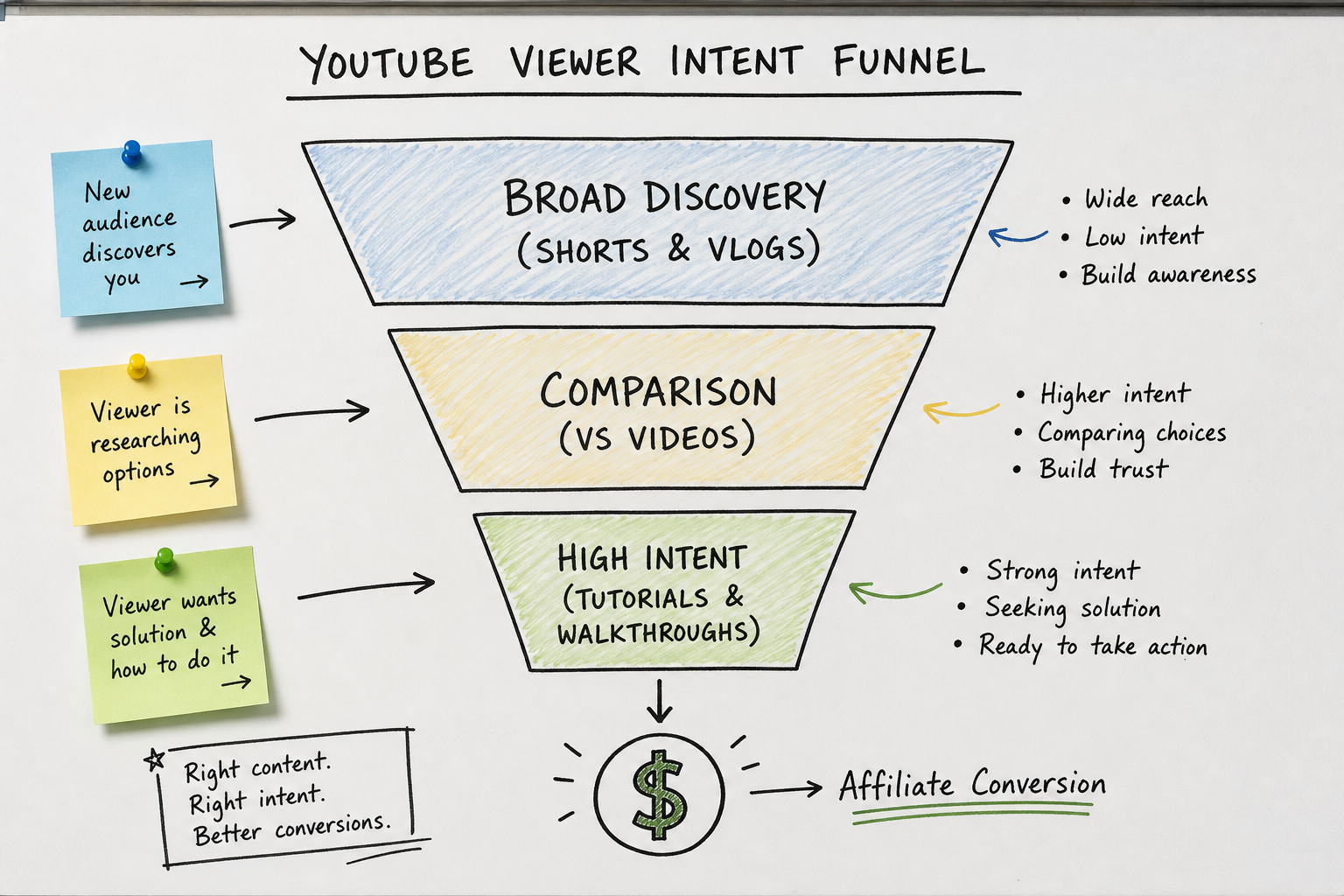
To drive clicks, you must map your content to the viewer's buying journey.
1. Top of Funnel: Listicles and "Best Of" Videos
Format: "Top 5 Video Editing Softwares for Beginners in 2026" Intent: The viewer knows they have a problem (they need editing software) but they don't know the market landscape. Strategy: Give a brief, fair overview of 5 tools. Provide affiliate links for all of them. You act as the curator. These videos rank well in search and capture viewers in the research phase.
2. Middle of Funnel: VS / Comparison Videos
Format: "Premiere Pro vs. DaVinci Resolve: Which is Actually Better?" Intent: The viewer has narrowed down their choices to two options. They have high purchasing intent but need a final push to make a decision. Strategy: Be painfully honest. Highlight the flaws of both. If you only say good things, it feels like an infomercial. Recommend Tool A for one type of person, and Tool B for another. Provide links for both.
3. Bottom of Funnel: Deep-Dive Tutorials
Format: "How to Color Grade in DaVinci Resolve (Step-by-Step)" Intent: The viewer has basically decided on the tool and wants to see exactly how it works before committing to the download or purchase. Strategy: Do not sell the software. Teach them how to get a specific result using the software. The software sells itself through your demonstration. Tell them they can get a free trial in the description to follow along with the video.
Link Management and Tracking
As your channel grows and you publish dozens or hundreds of videos, managing raw affiliate links becomes a logistical nightmare. If a software company changes its affiliate network (e.g., moving from Impact to PartnerStack), your old links will break.
You cannot reasonably go back and edit the descriptions of 150 old videos.
Use Link Cloaking / Redirects
Never paste a raw affiliate link (like brand.com/?ref=12345&utm_source=youtube) directly into your description.
Instead, use a link management tool to create a branded redirect. If you own the domain yourchannel.com, set up redirects so that yourchannel.com/notion points to your Notion affiliate link.
If Notion ever changes their affiliate backend, you simply update the redirect in one central dashboard, and every single YouTube video you have ever published instantly updates to the new destination.
- For WordPress users: Use the free Pretty Links plugin or ThirstyAffiliates.
- For non-WordPress users: Use a service like Bitly, Rebrandly, or Geniuslink (which is especially powerful for localizing Amazon links based on the viewer's country).
Common Pitfalls and Mistakes to Avoid
Even experienced creators stumble when implementing affiliate strategies. Avoid these common failure modes:
- Promoting garbage for a high payout: If a web host offers a $200 CPA but their servers constantly crash, do not promote them. Your audience will blame you, not the software. The lifetime value of viewer trust is always higher than a one-time CPA.
- The "Link Dump" description: Pasting 40 affiliate links for every piece of gear in your studio at the bottom of every video. It looks spammy and triggers YouTube's algorithmic spam filters. Only include links relevant to the specific video, plus a curated "My Core Gear" section.
- Ignoring YouTube Shorts: While long-form videos convert better, Shorts are exceptional for top-of-funnel discovery. While YouTube removed clickable links in Shorts descriptions and comments to fight spam, you can now use the "Related Video" feature. Link a short, punchy Short to your long-form deep-dive tutorial. The Short gets the eyeballs; the long-form video secures the affiliate click.
- Forgetting to negotiate: Once you start sending a company 10 to 20 sales a month, you are no longer a standard affiliate. Email their affiliate manager. Ask for a custom landing page with your channel's logo on it. Ask for a personalized promo code. Ask for a permanent commission bump. Most affiliate managers have discretionary budgets for high-performing creators.
Next Steps for Your Channel
If you want to treat your YouTube channel like a real business in 2026, affiliate marketing is not optional; it is mandatory infrastructure.
Start by auditing your existing content. Which of your past videos are still getting daily search traffic? Go back and optimize those descriptions. Add a pinned comment. Ensure your links are above the fold.
Next, head over to the AffiliList directory to search for software and tools relevant to your exact niche. Filter by recurring commissions to build a baseline of passive income that stabilizes the wild fluctuations of YouTube AdSense. By bridging the gap between what your audience is searching for and the tools that solve their problems, you build a monetization engine that works 24/7, long after the video was published.